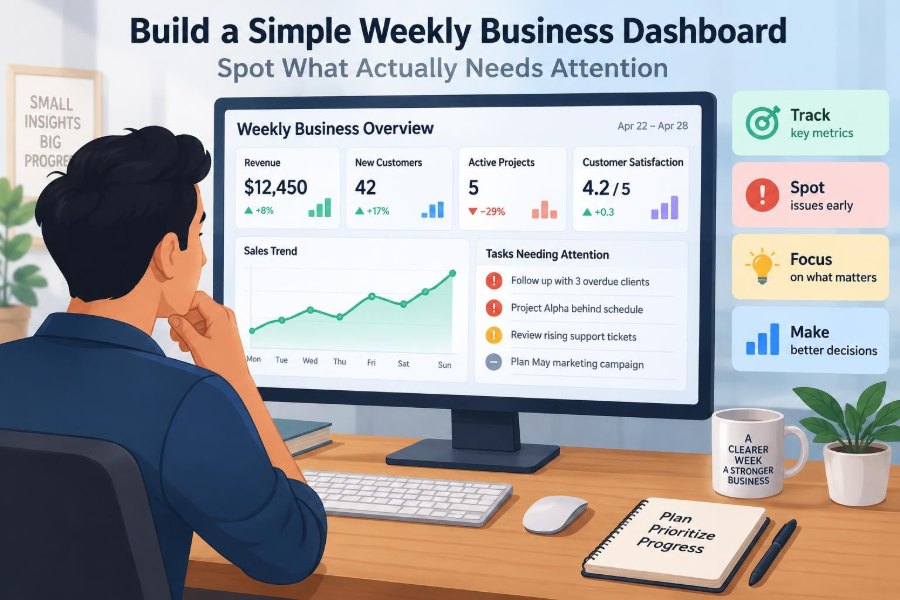

Monday morning can feel deceptively busy. Sales figures are in one spreadsheet, customer complaints sit in an inbox, cash information is somewhere in accounting software, and each manager has a different view of what needs fixing first.
The result is often a meeting full of updates but short on decisions. A team can spend an hour describing activity—campaigns launched, calls made, orders shipped—without seeing whether the business is becoming healthier or where a problem is starting to form.
A simple weekly business dashboard changes that. It is not a wall of charts or a performance-reporting exercise. It is a deliberately small view of the signals that help people decide where to look, what to discuss, and what action to take next.
The challenge is choosing measures that reveal reality without creating noise. A useful dashboard should make attention scarce in the right places: the issues that are material, changing, or likely to affect the week ahead.
🧭 Start With the Dashboard’s Real Job
A weekly dashboard is a decision tool, not a data archive. Its job is to help leaders and teams identify exceptions: results that are off track, trends that have shifted, and commitments that need intervention.
If a number cannot influence a decision, a conversation, or an owner’s next action, it probably does not belong on the weekly view. It may still be useful in a detailed report, but not in the small set of signals reviewed regularly.
🎯 Define the Questions Before Choosing Metrics
Begin with the questions the business must answer each week. A retail business may ask whether demand is converting into sales, whether stock is becoming unavailable, and whether returns are increasing. A service firm may ask whether work is profitable, deliverable, and likely to be paid on time.
Write down five to eight questions before opening a spreadsheet. This prevents the common mistake of choosing measures simply because the data is easy to export.
- Are we on track to meet this period’s plan?
- Where is revenue, margin, cash, or service performance changing?
- What is at risk in the next one to four weeks?
- Which issue needs a named decision or owner?
🔍 Separate Outcomes From Activity
Activity metrics count what people do: sales calls, social posts, proposals sent, units produced, or training sessions completed. Outcome metrics show what those activities produced: revenue won, conversion rate, defect rate, repeat purchase, or delivery reliability.
Both can matter, but they answer different questions. If sales are below plan, call volume may explain part of the story; it should not replace the sales result. A dashboard dominated by activity can make a busy organization look healthy even when outcomes are weakening.
📈 Use Leading and Lagging Indicators Together
Lagging indicators describe a result after it has happened, such as last week’s revenue or invoices paid. Leading indicators offer an earlier clue about a future result, such as qualified opportunities, production backlog, or customer response time.
Neither type is sufficient alone. Lagging measures establish whether performance actually occurred. Leading measures help the team act before a result becomes difficult to change.
For example, a consultancy might track weekly billed revenue as a lagging measure and the value of signed-but-unscheduled work as a leading measure. A falling pipeline does not guarantee a poor month, but it gives the team time to improve scheduling or sales activity.
🧱 Build Around the Business Model
There is no universal set of perfect dashboard metrics. A subscription company depends heavily on retention and recurring revenue; a manufacturer may need to watch yield, late orders, and material availability; a restaurant may focus on covers, labour cost, waste, and customer feedback.
Choose measures that reflect how the organization creates value. Ask: what must go right for us to sell, deliver, earn a margin, collect cash, and keep customers? The answers usually reveal the dashboard’s core categories.
🗂️ Organize the Dashboard Into Five Views
A practical starting structure is to group metrics into a few understandable views. This keeps a reader from jumping between unrelated numbers and makes omissions easier to spot.
| View | Typical question | Example metric |
|---|---|---|
| Demand and sales | Are customers buying? | Revenue versus plan |
| Delivery and operations | Can we deliver reliably? | On-time completion rate |
| Customer health | Are customers staying satisfied? | Open escalations |
| Financial health | Are we earning and collecting? | Gross margin or overdue receivables |
| People and capacity | Do we have the ability to execute? | Critical-role coverage |
Not every business needs every view every week. The structure is a prompt for balanced thinking, not a requirement to fill every box.
📏 Limit the Number of Measures
A dashboard with 40 metrics is usually a report disguised as a dashboard. The reader cannot tell which movement matters, and the meeting becomes a tour of numbers rather than a discussion of priorities.
A smaller organization may work well with eight to twelve core metrics. A larger operation may need more, but should still present a concise executive summary with drill-down detail available elsewhere. Attention is the scarce resource being managed.
🧮 Give Every Metric a Clear Definition
Ambiguous measures cause avoidable debate. “Sales,” for example, might mean orders received, invoices issued, cash collected, or recurring contract value. “On time” might be measured against the original promise date or a revised date.
Create a simple metric definition for each item: name, calculation, source, owner, update timing, and known limitations. This does not need to be bureaucratic. It prevents a dashboard from becoming a set of numbers that different people interpret differently.
🗓️ Match the Time Window to the Decision
Weekly reporting does not mean every metric should only show one week. A single week can be unusually high or low because of timing, holidays, a large order, or a delayed invoice.
Show the current week where it is meaningful, but add enough context to interpret it: month-to-date results, a rolling four-week trend, or comparison with the same point in the plan. The right window depends on the natural rhythm of the business.
⚖️ Compare Against a Useful Baseline
A number alone rarely tells a story. Revenue of 50,000 could be excellent, weak, or ordinary depending on the plan, capacity, season, and prior performance.
Useful comparisons include target, budget, forecast, prior period, and rolling average. Avoid adding every possible comparison. Use the one that answers the decision question most directly: “Are we delivering what we intended?” or “Is this changing in a concerning direction?”
🚦 Use Status Colours Sparingly
Red, amber, and green status markers make a dashboard scannable, but only when their rules are clear. A colour should reflect a defined condition, such as performance outside an agreed tolerance or a trend that requires review.
Do not use green simply because a measure is positive in spirit. A customer satisfaction score can look good while declining steadily. Consider a neutral status for stable metrics and reserve colour for exceptions that deserve attention.
📉 Show Trends, Not Just Snapshots
Many operational problems appear first as direction rather than as a dramatic single result. Delivery time creeping upward over four weeks may matter long before it breaches a formal target.
A small sparkline, a short sequence of recent values, or an arrow indicating direction can be enough. The aim is not visual sophistication; it is helping the reader distinguish a one-off variation from a developing pattern.
🔗 Connect Measures to the Chain of Cause and Effect
Useful dashboards make relationships visible. Lower conversion can reduce future revenue. Late supplier deliveries can create stockouts, which can affect customer orders and cash collection. High employee absence can strain capacity and increase service delays.
Do not assume correlation proves causation. Instead, use connected measures to form better questions. If completed orders fall while backlog rises and staffing is unchanged, a capacity bottleneck may be worth investigating.
💰 Include Cash, Not Only Profit
A profitable business can still face pressure if customers pay slowly, inventory grows too quickly, or major costs fall due before cash is received. Profit and cash answer related but different questions.
For many businesses, a weekly dashboard should include one or two cash-relevant signals: bank balance, expected cash position, overdue receivables, collection rate, or upcoming commitments. The suitable measure depends on how volatile cash timing is.
These figures should be interpreted carefully. A weekly balance can move because of normal payment timing, so a short cash outlook is often more useful than reacting to one date’s balance.
👥 Make Customer Signals Actionable
Customer health is more than an average satisfaction score. Averages can hide a small number of serious problems, particularly where a few accounts represent a large share of revenue.
Track signals that help a team act: unresolved critical cases, response-time breaches, cancellations, repeat contacts, product returns, or at-risk key accounts. Add brief context when needed: what happened, who owns the response, and when the next update is due.
🏭 Reflect Operational Reality
Operations metrics should reveal reliability, quality, flow, or capacity—not merely total output. A factory may produce many units while defects rise. A project team may close many tasks while deadlines for critical work slip.
Choose the operational constraint that most affects customers or economics. Examples include order cycle time, first-pass quality, on-time delivery, backlog age, rework hours, or system availability. Keep the definition stable long enough to learn from the trend.
🧑🤝🧑 Treat People Data With Care
People measures can identify execution risks, such as vacancies in essential roles, persistent overtime, safety incidents, or training gaps. They should not turn a dashboard into a tool for intrusive surveillance.
Aggregate data is often more appropriate than individual-level reporting. Use it to ask whether the organization has sustainable capacity, not to reward visibility or pressure people to appear constantly busy.
🔮 Include a Short Forward Look
Historical reporting explains what happened. Management also needs a view of what could happen next. Add a small forward-looking panel for significant opportunities, risks, decisions due, or expected changes over the next few weeks.
This is not a claim of certainty. A forecast is an informed estimate based on current information, and it should state assumptions where they matter. A useful note might say that next month’s capacity is constrained if two vacancies remain unfilled.
📝 Add Commentary Only Where It Changes Understanding
Numbers need context, but a dashboard should not become a page of prose. Use short commentary for exceptions: what changed, why it likely changed, the likely impact, and the next action.
A helpful format is: “On-time delivery fell because a supplier shipment arrived late; three priority orders are affected; operations lead will confirm recovery dates by Wednesday.” This turns observation into managed work.
👤 Assign an Owner to Every Exception
A metric can have a data owner and an action owner. The data owner ensures it is accurate and updated. The action owner coordinates the response when the measure indicates a problem.
Without this distinction, dashboards can create passive concern. Everyone sees the red indicator, assumes someone else is dealing with it, and the issue returns unchanged next week.
⏱️ Design the Weekly Review Meeting
The dashboard works best when paired with a consistent review routine. Send it early enough for participants to read it, then use the meeting to discuss exceptions and decisions rather than reading each figure aloud.
- Start with the few changes that materially affect goals or risk.
- Ask what evidence explains the change and what remains uncertain.
- Agree on a decision, action, owner, and due date.
- Review prior commitments before opening new topics.
This rhythm makes the dashboard a management system rather than a document produced for its own sake.
🛠️ Start With Simple Tools
A spreadsheet can be an excellent first dashboard. It is flexible, inexpensive, and fast to change while the team learns which measures are useful. Accounting systems, CRM platforms, project tools, and business-intelligence software may later automate parts of the process.
Automation is valuable when it reduces errors and delays, but it cannot solve poor metric design. Build the logic first, validate the numbers, and only then invest effort in sophisticated visualizations or integrations.
🧪 Test the Dashboard With Real Decisions
Before treating the dashboard as final, use it for several weekly reviews. Notice which measures repeatedly prompt useful discussion, which are misunderstood, and which never influence a decision.
Ask attendees to identify a decision they made because of the dashboard. If no one can name one, the dashboard may be reporting information rather than directing attention. Remove weak measures and refine definitions instead of continuously adding more.
⚠️ Avoid Vanity Metrics
Vanity metrics look impressive but do not reliably show whether the business is progressing. Website visits without conversion context, social followers without customer impact, and raw task counts without quality or outcome are common examples.
A metric is not useless because it is high-level or positive. It becomes weak when it cannot be connected to value, risk, or a realistic management choice. Pair broad awareness measures with the next step in the customer or operational journey.
🧯 Watch for Gaming and Unintended Behaviour
People naturally respond to what is measured. If a call centre is judged only on speed, employees may end calls too quickly. If a warehouse is judged only on units shipped, quality checks may receive less attention.
Use balanced measures and periodically ask what behaviour a target could encourage. This does not eliminate trade-offs, but it makes them visible. A dashboard should support good judgment rather than invite people to optimize one number at the expense of the whole system.
🧹 Keep Data Quality Visible
Dashboards can create false confidence when underlying data is incomplete, delayed, or inconsistently entered. A polished chart does not make an unreliable source more reliable.
Flag material data limitations directly. For example, label a figure as provisional if invoices are still being processed, or note that a system change altered the way a measure is captured. Transparency is better than precise-looking misinformation.
🔄 Review Metrics as the Business Changes
Metrics should be stable enough to reveal trends, but not permanent by default. A measure that mattered during a launch, turnaround, seasonal rush, or system migration may become less relevant once the situation changes.
Review the dashboard quarterly or when strategy changes. Retire measures that no longer guide action, add indicators for new risks, and preserve historical definitions where comparisons still matter.
📋 A Simple One-Page Weekly Layout
A one-page layout can work for many teams. At the top, show three to five overall outcome measures. In the middle, group the operational and customer signals that explain those outcomes. At the bottom, list the most significant risks, decisions, and actions.
Each metric row can include the current value, relevant comparison, recent trend, status, and a short note only if action is needed. This arrangement encourages the reader to move from “What happened?” to “Why?” and then to “What will we do?”
🧠 Know When a Dashboard Is Not Enough
A dashboard points to where investigation is needed; it rarely provides the complete answer. A declining margin might require analysis by product, customer, cost category, or contract. A dashboard should link conceptually to deeper reports, even if it does not contain them.
Do not force complex analysis into the weekly page. Use the dashboard to trigger focused follow-up, then bring the conclusion and decision back to the next review.
✅ Build Attention Around Action
The strongest weekly dashboards are modest in size and demanding in purpose. They show outcomes, early warnings, and important risks in enough context to support a decision.
Start with the business questions, select a limited set of clearly defined measures, show trends and comparisons, and attach ownership to exceptions. Review it consistently, learn from its use, and refine it as the business changes.
A weekly dashboard succeeds when it makes the next important action clearer—not when it contains the most data. Over time, that clarity turns scattered updates into a shared operating rhythm. 📊🧭