
A customer is waiting for an answer that should have taken a day. A proposal sits untouched in an approval queue. The operations team is working late, yet the backlog still grows. The immediate response is often familiar: “We need more people.”
Sometimes that is true. A business with steadily rising demand may genuinely need more capacity. But hiring into a broken workflow can make the problem more expensive without making it faster.
Delays are often created by the way work moves: too many handoffs, unclear decisions, incomplete information, competing priorities, or one overloaded specialist. Until those constraints are visible, adding staff may simply add more work to the same crowded point.
Fixing bottlenecks means improving flow. It requires managers to look beyond busy employees and ask a more useful question: where does work wait, and why does it wait there?
🚦 What a Workflow Bottleneck Actually Is
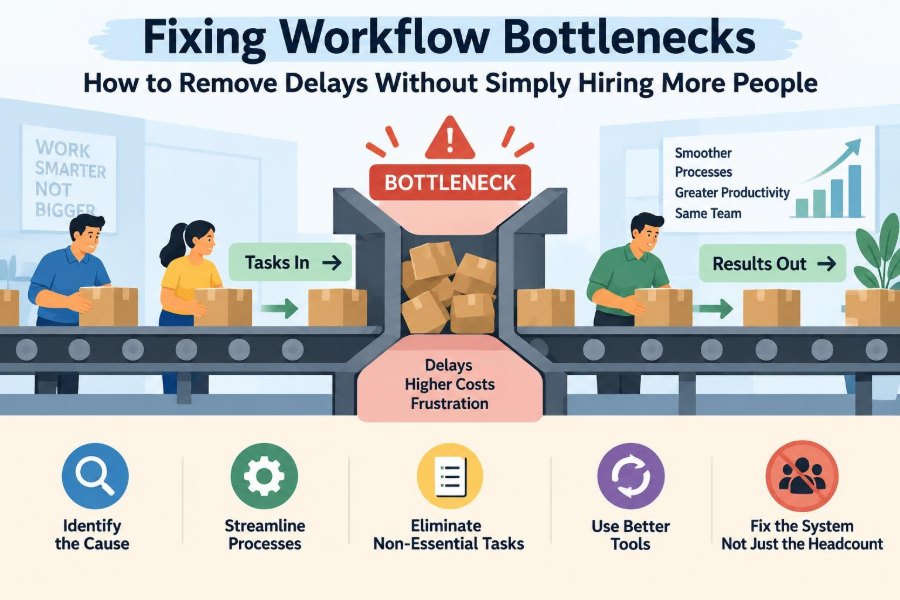
A workflow bottleneck is a stage where work arrives faster than it can be completed. It restricts the output of the wider process, much like the narrowest part of a funnel determines how quickly liquid can pass through it.
The bottleneck is not always the team that appears busiest. A quiet approval step, a missing-data check, or a weekly meeting may be the real constraint because work cannot move forward until it is cleared.
For example, a marketing team may create campaign requests quickly, but if one legal reviewer must approve every claim, completed campaigns will be limited by legal review capacity—not by the number of marketers.
⏳ Why Delays Matter Beyond Missed Deadlines
Long cycle times affect more than a calendar. Customers receive slower responses, employees spend time chasing updates, and managers make decisions with outdated information.
Delays also hide cost. Work that waits often requires follow-up emails, status meetings, rework after priorities change, and rushed effort near a deadline. These activities may look productive, but they do not move the original work closer to completion.
When delays become normal, people compensate by starting tasks early, copying more colleagues, or creating unofficial shortcuts. Those habits can protect an individual deadline while making the overall system less predictable.
🧭 Separate a Capacity Problem From a Flow Problem
A capacity problem occurs when the organization has consistently less available time, equipment, or skill than the volume of necessary work requires. Hiring, outsourcing, automation, or reducing demand may then be appropriate responses.
A flow problem occurs when available capacity is poorly coordinated. Work may wait for clarification, be passed between teams, be interrupted by urgent requests, or be processed in large batches. In these cases, additional staff may have limited effect.
| Signal | Likely capacity issue | Likely flow issue |
|---|---|---|
| Workload pattern | Demand exceeds resources most weeks | Resources have uneven or interrupted workloads |
| Queue location | Backlog grows at a consistently busy step | Work waits across handoffs, decisions, or rework loops |
| Effect of extra effort | More completed work results directly | More work enters but completion barely changes |
| Best first response | Add, protect, or flex capacity | Simplify, sequence, clarify, and reduce waiting |
Many real situations contain both problems. The practical goal is not to choose a label perfectly, but to avoid paying for capacity before addressing avoidable friction.
🔍 Map the Work as It Really Happens
Process diagrams often show an ideal path. Bottleneck analysis needs the actual path, including waiting, return loops, informal messages, exception handling, and approval requests.
Start with one clearly defined item of work: a customer complaint, invoice, product change, hiring request, or client proposal. Follow it from request to completion and ask the people doing the work what happens when information is missing or priorities change.
- What triggers the work?
- Who touches it, reviews it, or approves it?
- Where does it wait, and for how long?
- What causes it to be returned or restarted?
- What tools, files, or decisions are required next?
This exercise often reveals that the time spent actively working is small compared with the time spent waiting.
📏 Measure Waiting Time, Not Just Activity
A team can report high utilization while customers experience poor service. That is because activity measures show whether people are working; they do not show whether work is flowing.
Track a few simple measures for a selected workflow: total time from request to completion, time spent actively processing, queue size at each stage, and the proportion of work that comes back for correction.
The difference between total elapsed time and active work time is especially revealing. If a task takes two hours of effort but takes twelve days to finish, the management problem is mostly about coordination, priority, or waiting—not employee effort.
🧱 Find the Constraint Before Improving Everything
Process improvement can become unfocused when every irritation is treated as equally urgent. A better approach is to identify the point that most limits throughput, then improve that point first.
Look for queues that persist, work that regularly waits for the same person or system, and stages where deadlines are frequently missed. Speak with the people at that stage: they usually understand the immediate obstacles better than a dashboard does.
A constraint can move after it is improved. That is normal. Once one blockage is relieved, the next limiting stage becomes easier to see.
🧮 Use Queue Size as an Early Warning Signal
A queue is work waiting to be processed. Some waiting is unavoidable, particularly when demand varies. A growing queue, however, is a sign that the process is receiving work faster than that stage can reliably handle it.
Monitor queue age as well as queue volume. Ten items waiting for one hour may be manageable; ten items waiting for ten days may signal a hidden dependency or neglected priority.
Make queues visible in a shared board, system view, or daily operating report. Invisible queues encourage assumptions that work is “being handled” when it is simply sitting between owners.
🎯 Reduce Too Many Priorities at Once
People rarely work on one task continuously. Yet when every request is labelled urgent, employees switch among assignments, reopen files, and repeatedly rebuild context. This is called context switching, and it increases completion time even when everyone is working hard.
Leaders can reduce this by defining a short, visible priority order. The question is not whether all work matters; it is which work must move first when capacity is limited.
A useful rule is to limit the number of active initiatives or urgent jobs entering a team at one time. Finishing a smaller set of important items often delivers more value than partially progressing a large set.
🚧 Set Work-in-Progress Limits
Work in progress, often shortened to WIP, is work that has started but is not yet complete. High WIP creates queues, makes status harder to understand, and ties up attention in unfinished tasks.
A WIP limit sets a maximum number of items allowed in a stage. When the limit is reached, the team helps move existing work forward before accepting more.
For instance, a design review group might accept only five active reviews at a time. This may feel slower at first because new requests wait before starting, but it prevents an even larger hidden wait after work has been launched.
🔄 Shrink Handoffs That Add No Value
Every handoff creates a risk: the next person may not know the context, may be unavailable, or may interpret the request differently. Handoffs are sometimes necessary for control or expertise, but they should earn their place.
Review each transfer of responsibility. Could the first person complete more of the task? Could two roles collaborate briefly instead of sending work back and forth? Could routine information travel with the item automatically?
Removing one unnecessary handoff can save far more time than reducing an individual task by a few minutes, because it also removes waiting, clarification, and ownership ambiguity.
📝 Improve the Quality of Incoming Work
Many bottlenecks are fed by incomplete requests. A finance team waits for purchase details, an IT team waits for access requirements, or a manager cannot approve a plan without expected costs and risks.
Create a clear definition of “ready.” Before work enters a constrained stage, it should include the information needed to begin. Simple request forms, checklists, templates, and examples can help.
This is not an argument for bureaucracy. The goal is to gather only the information that prevents predictable interruption. A long form that nobody understands can become a bottleneck of its own.
✅ Standardize Repetitive Decisions
Repeatedly deciding the same routine issue consumes scarce managerial attention. If every small expense, content update, or customer exception requires a senior person’s judgment, approvals will accumulate.
Standardization means defining ordinary cases in advance: approval thresholds, acceptable service responses, required evidence, and escalation rules. Staff can then handle routine work confidently while leaders focus on exceptions.
Good standards are reviewed as conditions change. They should guide judgment, not force people to apply an outdated rule to an unusual situation.
🧑⚖️ Redesign Approval Paths
Approvals protect quality, spending, compliance, and reputation. But approval layers often expand over time without anyone reassessing whether every reviewer has a distinct decision to make.
For each approval, identify the decision owner and the purpose of review. If several people merely need awareness, a notification may be enough. If reviewers are checking the same issue, consolidate the check.
- Define who can approve routine cases.
- Set response expectations for time-sensitive decisions.
- Escalate only when a request crosses a defined risk threshold.
- Record decisions in the work item rather than scattering them across email threads.
Do not remove controls casually in regulated, contractual, or safety-sensitive work. Redesign should preserve necessary governance while eliminating duplication.
🛠️ Remove Rework at Its Source
Rework happens when work must be corrected, clarified, or redone. It is particularly damaging because it consumes capacity twice and often returns to an already congested stage.
Classify recurring rework rather than treating it as random. Is the cause unclear requirements, inconsistent data, insufficient training, an outdated template, or a mismatch between teams?
Suppose a sales proposal repeatedly returns from pricing review because discount assumptions are missing. The durable fix is not asking pricing to work faster. It is changing the proposal intake so the assumptions are captured before review begins.
📦 Process Smaller Batches Where Possible
Batching means collecting work and processing it together: approving invoices every Friday, reviewing content at month-end, or sending all requests to a specialist in one large bundle. Batches can be efficient when setup work is substantial, but they also create waiting.
Smaller, more frequent batches reduce the time an individual item sits idle and reveal errors sooner. A manager reviewing a few requests daily may create a smoother flow than reviewing a large stack once a week.
The right batch size depends on the work. Consider the trade-off between the efficiency of grouping similar tasks and the delay imposed on everything waiting for the next batch.
🔀 Create Clear Rules for Exceptions
Exceptions are requests that do not fit the normal path: an unusual customer demand, a system failure, a high-value order, or an urgent compliance concern. Without a defined route, they interrupt whoever seems most able to help.
Build an exception path with named decision makers, required evidence, and a clear escalation point. This protects the main workflow while ensuring unusual cases receive appropriate attention.
Be cautious about calling every important request an exception. If a category appears frequently, it belongs in the standard process, not in a permanent emergency lane.
🧠 Protect Scarce Specialist Time
Some bottlenecks exist because only one or two people hold critical expertise. Their calendars fill with routine questions, meetings, and low-risk checks, leaving little time for work only they can do.
Protect their contribution by filtering requests, preparing information before escalation, and moving routine tasks to trained colleagues. Office hours, decision guides, and a shared knowledge base can reduce repeated interruptions.
This does not mean isolating specialists. It means using their attention deliberately, especially where their judgment changes the outcome.
🌱 Cross-Train Without Creating New Risk
Cross-training reduces dependence on a single person and makes absence less disruptive. It is particularly useful for repeatable tasks with clear quality criteria.
However, cross-training is not simply giving everyone access to everything. In technical, financial, legal, or safety-sensitive work, roles may require formal authority, specialist knowledge, or supervision.
Start with adjacent tasks and create a staged learning path: observe, practice with review, complete standard cases independently, and escalate nonstandard cases. This broadens capacity while protecting quality.
🤖 Automate Friction, Not Confusion
Automation can remove manual copying, status chasing, routing, reminders, and basic validation. These improvements are valuable when the underlying rule is stable and clearly understood.
Automating a confusing process, however, can make a bad workflow run faster in the wrong direction. Before selecting a tool, simplify the steps and agree on ownership, inputs, and exceptions.
A useful test is simple: if two experienced employees would handle the same routine request differently, clarify the process before automating it. Technology should reinforce a sound decision, not substitute for one.
📬 Make Ownership Visible at Every Stage
Work often stalls because nobody knows who is responsible for the next move. A shared mailbox, vague project board, or broad group email can create the appearance of ownership without accountability.
Every item should have a current owner, a next action, and a clear condition for transfer. Team ownership can still exist, but someone must coordinate the immediate step.
Visible ownership also makes support easier. Instead of asking, “Has anyone looked at this?” a colleague can see what is needed and who can remove the obstacle.
📊 Use Short Operating Reviews, Not Status Theatre
Regular review meetings can help teams identify aging work, blocked items, and changing demand. They become unhelpful when they turn into lengthy reports about activity rather than decisions about flow.
Keep reviews focused on exceptions: what is stuck, why it is stuck, who will act, and when the team will check again. A visual queue and a few operational measures are usually more useful than slide decks.
Managers should also look for recurring patterns. One late item may be normal variation; the same delay every week is evidence that the workflow needs redesign.
🧪 Test Changes on a Manageable Scale
Workflow changes affect habits, service levels, controls, and customer expectations. Large redesigns can create disruption before the team knows whether the new approach works.
Run a small, time-bound trial where possible. For example, one department might pilot daily approvals, a new intake checklist, or a WIP limit for a particular request type.
Define what will be observed before the pilot begins: turnaround time, rework, customer impact, employee workload, or error patterns. Keep what improves the system and revise what creates unintended consequences.
⚖️ Balance Speed With Quality and Control
A faster process is not automatically a better process. Cutting review steps may reduce turnaround time while increasing errors, regulatory exposure, safety risk, or customer dissatisfaction.
The objective is reliable flow at an appropriate level of control. Low-risk routine work can often move quickly through standard paths, while high-risk work deserves deeper scrutiny.
Managers should be explicit about these distinctions. When teams understand the risk logic behind a process, they are less likely to bypass controls just to meet a deadline.
🚫 Avoid the “Work Harder” Response
When a backlog rises, asking people to work faster or stay late may provide temporary relief. It can be reasonable during a short, unusual surge. As a permanent strategy, it usually hides the cause and increases fatigue.
Overtime can also distort diagnosis. A process may appear to have enough capacity only because employees are supplying unsustainable extra effort. Once that effort ends, the backlog returns.
Use pressure sparingly and pair it with problem-solving. Ask what is creating the queue, what can be stopped or deferred, and which obstacle can be removed permanently.
💼 Know When Hiring Is Still the Right Answer
Process improvement is not a substitute for adequate staffing. After unnecessary delay, rework, and poor coordination have been addressed, demand may still exceed sustainable capacity.
Hiring is especially reasonable when the workload is stable, the constrained work requires specialized expertise, service commitments are routinely missed, and existing staff have little recoverable time. It may also be necessary to provide resilience against predictable absence or business growth.
The difference is that hiring should solve a defined capacity gap. A clear workflow allows new employees to become productive faster instead of joining a confusing queue.
🧭 Build a Practical Bottleneck-Removal Routine
Teams do not need a large transformation program to begin. A recurring operating routine can turn bottleneck management into normal managerial work.
- Choose one important workflow and define its start and end points.
- Map the real path, including waits and returns.
- Measure queue age, total completion time, and common rework.
- Identify the current constraint and its main causes.
- Test one targeted change rather than many unrelated changes.
- Review the result and locate the next constraint.
This disciplined sequence prevents teams from confusing a long list of improvements with a meaningful improvement in flow.
🏁 The Core Principle: Improve Flow Before Expanding Headcount
Workflow bottlenecks are rarely solved by effort alone. They are usually shaped by system design: how work enters, who owns it, what information is available, where decisions sit, and how many unfinished items compete for attention.
The most effective managers make delay visible, protect constrained resources, and remove the sources of waiting and rework. They distinguish between a genuine need for more capacity and a process that is wasting the capacity it already has.
Before adding people, make sure the work has a clear, reliable path through the organization. That principle reduces avoidable delay, improves employee experience, and makes any future investment in staffing far more productive.
When work flows well, people spend less time chasing, restarting, and waiting—and more time completing work that matters. 📊🚦