
A customer places an order, receives a confirmation, gets accurate updates, and has a problem resolved without having to repeat their story. From the outside, it can look effortless.
Behind that smooth experience is a business process: a repeatable way of turning an input, such as an order or request, into a useful outcome. When the process is unclear, work depends on memory, heroic effort, and last-minute messages.
That approach may survive when a company has five customers a week and everyone sits in the same room. It begins to fail when demand doubles, new employees join, suppliers change, or customers expect faster service.
Scalable processes are not about making work cold or bureaucratic. They are about designing reliable ways for people, information, decisions, and technology to work together as volume and complexity grow.
🏗️ What a Scalable Business Process Actually Is
A business process is a connected sequence of activities that produces a defined result. Hiring an employee, paying an invoice, handling a return, and launching a product are all processes.
A process becomes scalable when it can handle more transactions, customers, locations, or staff without quality, cost, speed, or control deteriorating at the same rate. It does not mean doing infinitely more work with no extra resources. It means growth is deliberate rather than chaotic.
🧭 Start With the Outcome, Not the Department Chart
Companies often begin by asking what each department does. A stronger starting point is the outcome the customer, employee, or business needs.
For example, “process returns” is inward-looking. “Give a customer a fair, timely resolution while recovering usable stock” defines the desired result and exposes the trade-offs the process must manage.
🎯 Define the Process Promise
Every critical process needs a plain-language promise: what it delivers, for whom, and under what conditions. This creates a boundary for design decisions.
- Order fulfilment: deliver the correct item to the right destination with reliable status information.
- Expense reimbursement: repay valid employee expenses with appropriate approval and records.
- Customer support: resolve or route a request with clear ownership and a documented answer.
A promise is not a marketing slogan. It is a practical test for whether each step adds value or merely adds friction.
🔎 Identify the Trigger and the Finish Line
Processes become confusing when nobody agrees where they begin or end. A trigger is the event that starts the work, such as a signed contract, a submitted application, or a customer payment.
The finish line should be equally explicit. “Team has reviewed it” is usually not an outcome. “Customer has received the approved refund and the accounting record is complete” is a clearer endpoint.
🗺️ Map the Work as It Really Happens
Before redesigning anything, map the current process. Follow a real piece of work from start to finish and ask the people performing each step what actually happens—not what a policy document says should happen.
A basic process map can show activities, handoffs, decisions, systems, delays, and exceptions. Its purpose is visibility. It often reveals that a task is entered into several systems, waits in an inbox, or returns to the previous team because key information was missing.
👥 Include the People Who Do the Work
Frontline employees know where customers get confused, where data is unreliable, and which unofficial workaround keeps the process moving. Excluding them produces elegant diagrams that fail on Monday morning.
Involve managers, specialists, technology teams, compliance or risk staff where relevant, and a small number of frequent users. Their perspectives differ: a warehouse worker may see packing errors, while finance sees the cost of correcting them later.
🔗 See Handoffs as Risk Points
A handoff occurs when work, information, or accountability moves between people, teams, systems, or suppliers. Most processes need handoffs, but every one can introduce delay, misunderstanding, or lost context.
Instead of asking only, “Who owns this task?” ask, “What must the next person receive to succeed?” The answer may include a complete customer record, a decision reason, a deadline, and a named owner.
📥 Design the Inputs Before Improving the Steps
Poor inputs create expensive downstream work. If a sales team can submit an order without delivery details, operations may spend time chasing information, rescheduling shipments, and apologizing to the customer.
Good process design specifies the minimum information, format, and validation needed at the point of entry. This is sometimes called quality at the source: prevent a known error early instead of building a repair team later.
⚖️ Separate Routine Decisions From Judgment Calls
Not all decisions deserve the same treatment. Routine, low-risk decisions can often follow simple rules. Unusual, high-impact, or ambiguous situations need human judgment and an escalation path.
A support team, for instance, may automatically replace an item within a stated policy while escalating suspected fraud or a safety concern. This distinction makes work faster without pretending every case is identical.
📏 Create Decision Rules That People Can Use
A policy that says “seek management approval where appropriate” leaves employees guessing. Operational rules should state the condition, the decision, the owner, and the evidence required.
For example: if an invoice differs from an approved purchase order beyond a defined tolerance, route it to the budget owner. The exact threshold depends on the organization’s risk appetite; the design lesson is to make decisions consistent and traceable.
🧩 Standardize the Repeatable Core
Standardization means agreeing on the best known way to perform recurring work: common fields, templates, checklists, naming conventions, and service steps. It reduces variation caused by different personal habits.
It should not erase useful expertise. A standardized customer-onboarding checklist can coexist with tailored advice for a complex client. The aim is to standardize what is predictable so people have more capacity for what is not.
🌿 Build Flexible Paths for Genuine Exceptions
Every scalable process needs an exception design. Treating every case as exceptional creates confusion; forcing every unusual case through a rigid standard path creates delay and frustration.
Define common exception categories, who can approve alternatives, what must be recorded, and when recurring exceptions should trigger a redesign. An exception log is valuable evidence: it shows where the “standard” process no longer matches reality.
⏱️ Remove Waiting, Rework, and Unnecessary Loops
Process improvement often focuses on how quickly someone completes a task. Yet total cycle time is frequently dominated by waiting: an unmonitored queue, a weekly approval meeting, or a missing data field.
Look for rework loops too. If customer service repeatedly corrects sales entries, the real issue may sit in the order form or training—not in customer service. Fixing causes at their source is more scalable than accelerating repair work.
🚦Use Queues Deliberately
A queue is work waiting to be handled. Queues are not automatically bad; they can organize demand and help teams prioritize. Hidden queues, however, make customers and managers believe work is progressing when it is simply waiting.
Make queues visible, assign an owner, define priorities, and set reasonable review intervals. A team should know which requests are urgent, which can wait, and what happens when the queue exceeds its workable capacity.
👤 Make Accountability Visible
When several teams touch a process, responsibility can disappear between them. A process owner is accountable for end-to-end performance, even though they may not perform every activity.
Roles should distinguish who does the work, who makes a decision, who provides input, and who needs to be informed. A simple responsibility matrix can help, but only if it reflects real authority rather than becoming a document nobody uses.
🧠 Capture Knowledge Outside People’s Heads
A process is fragile when its success depends on one experienced employee remembering special cases. Document essential knowledge in accessible playbooks, templates, decision guides, and short training materials.
Documentation should support action. A new employee needs to know what to do, where to find the right system, how to recognize an exception, and whom to contact—not merely read a broad description of company values.
💻 Choose Technology After Clarifying the Work
Software can route requests, validate fields, notify owners, store records, and report performance. But automating an unclear process usually makes its problems move faster.
First simplify the flow and clarify the rules. Then select technology that fits the volume, integration needs, security requirements, and skills of the team. A shared workflow tool may be sufficient for one business; another may need an integrated enterprise system.
🤖 Automate Stable, Rules-Based Tasks
Automation works best where inputs are structured, rules are stable, outcomes are predictable, and errors can be detected. Examples include generating a confirmation email after a valid order or routing a request based on category.
Human review remains appropriate for sensitive decisions, ambiguous cases, and activities where poor data could create unfair or harmful outcomes. Automation should make accountability clearer, not make decisions impossible to explain.
🔐 Build Controls Into the Flow
Controls are checks that reduce the risk of mistakes, misuse, loss, or noncompliance. They may include approval limits, access permissions, reconciliations, audit trails, and separation of duties.
A well-designed control is proportional to the risk. Requiring senior approval for every small purchase can slow operations without adding much protection, while allowing one person to create and pay a supplier may expose a business to avoidable risk.
📊 Measure Process Health, Not Just Busyness
Counting completed tasks can encourage speed at the expense of quality. Better measures connect to the process promise: elapsed time, error or rework rate, on-time completion, customer effort, backlog size, and cost per completed outcome.
Use a balanced set. A faster approval process is not an improvement if it produces inaccurate payments; fewer support tickets are not automatically positive if customers have simply given up asking for help.
📈 Design Metrics With Clear Definitions
Metrics become arguments when teams calculate them differently. Define what is included, when the clock starts and stops, which data source is authoritative, and how often the measure is reviewed.
For example, “time to resolve” may mean calendar time from customer contact to closure, or staff handling time only. Both can be useful, but they answer different questions. Clear definitions prevent misleading comparisons.
🧪 Test Before Rolling Out Widely
A redesigned process should be tested with realistic cases, including exceptions and incomplete information. A pilot in one region, customer group, or team can reveal training gaps, system issues, and unintended delays before a wider rollout.
Testing is not a sign of uncertainty; it is a practical way to learn. Set success criteria in advance, collect feedback from users, and adjust the design rather than treating the first version as permanent.
📣 Manage the Change, Not Only the Diagram
People may resist a new process because it adds work, threatens familiar expertise, or seems imposed without explanation. A process can be logically sound and still fail if those affected do not understand why it changed or how to use it.
Explain the problem being solved, train people in the actual workflow, provide support during the transition, and listen for friction. Managers must reinforce the new way of working; otherwise, old shortcuts quickly return.
🏢 Scale Across Teams and Locations Carefully
As companies expand, local teams often adapt processes to different customers, regulations, languages, or supply conditions. Some adaptation is necessary. Uncontrolled variation, however, makes reporting, training, and service consistency difficult.
A useful model is global principles with local configuration. Keep the core outcome, data definitions, controls, and key metrics consistent, while allowing documented local changes where a real business need exists.
🌡️ Plan for Capacity Rather Than Waiting for Failure
A process has capacity limits: people can review only so many cases, a supplier can ship only so much inventory, and a system may slow under higher demand. Capacity planning identifies likely constraints before they become customer-facing failures.
Consider seasonal peaks, staff absences, supplier dependencies, and the mix of simple versus complex cases. Building some slack into a critical process can be wiser than operating every team at maximum utilization, where one disruption creates a large backlog.
⚠️ Recognize Common Design Mistakes
Several habits make processes harder to scale:
- Copying another company’s workflow without understanding different customers, risks, or systems.
- Adding approval layers to solve a quality problem caused by missing information.
- Measuring only speed and overlooking accuracy, fairness, or customer experience.
- Automating exceptions before the routine path is stable.
- Writing documentation once and never updating it after changes.
The shared pattern is treating a process as a static chart rather than a living operating system.
🔄 Treat Improvement as a Management Routine
Conditions change: customer expectations shift, products evolve, volumes rise, and new risks appear. A scalable process therefore needs regular review, not a one-time redesign project.
Review performance, exception trends, customer feedback, and employee observations at a suitable rhythm. Prioritize improvements by impact and feasibility, make one change at a time where possible, and check whether the result actually improved the outcome.
🪜 A Practical Build Sequence
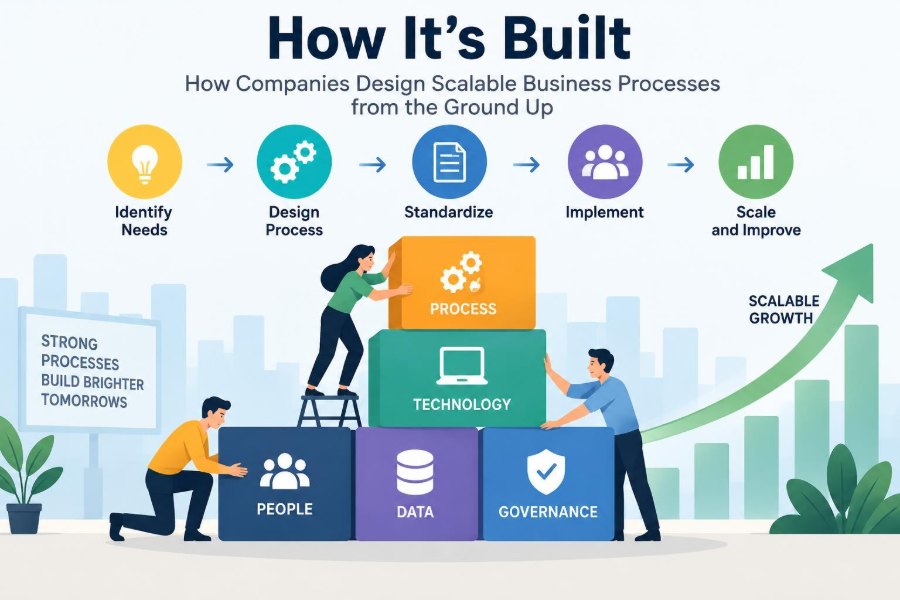
For a new or troubled process, a disciplined sequence prevents teams from jumping straight to tools or policies:
- Define the outcome, customer, trigger, and endpoint.
- Map the current flow using real cases.
- Find bottlenecks, defects, handoffs, and recurring exceptions.
- Design the simplest reliable standard path and decision rules.
- Assign ownership, controls, measures, and escalation routes.
- Test, train, launch, and improve from evidence.
Small organizations can apply this with a whiteboard and a spreadsheet; larger ones may use specialized process-management tools. The logic is the same.
🧱 The Core Principle: Make Good Work Easier to Repeat
The strongest processes do not rely on employees working harder to overcome a broken system. They make the correct action clear, supply the information needed to perform it, and provide a sensible route when reality does not fit the normal pattern.
Scalability is therefore a design discipline: simplify the routine work, protect important controls, preserve human judgment for meaningful decisions, and learn from the points where work breaks down.
A scalable business process is built by turning reliable work into a shared, visible, adaptable system—not by asking people to perform miracles as demand grows. When the system supports people well, growth becomes far easier to manage. 📊 🧭 ⚙️