
A customer sends a late-night complaint. By morning, someone in support has copied the details into a ticketing system, another employee has checked the order history, and a manager has asked finance whether a refund needs approval. The work is familiar: necessary, repetitive, and spread across several people and systems.
For years, organizations have tried to reduce this friction with templates, rules, dashboards, and conventional automation. Those tools help, but many business processes still stall whenever the next step requires interpretation, a decision, or coordination across departments.
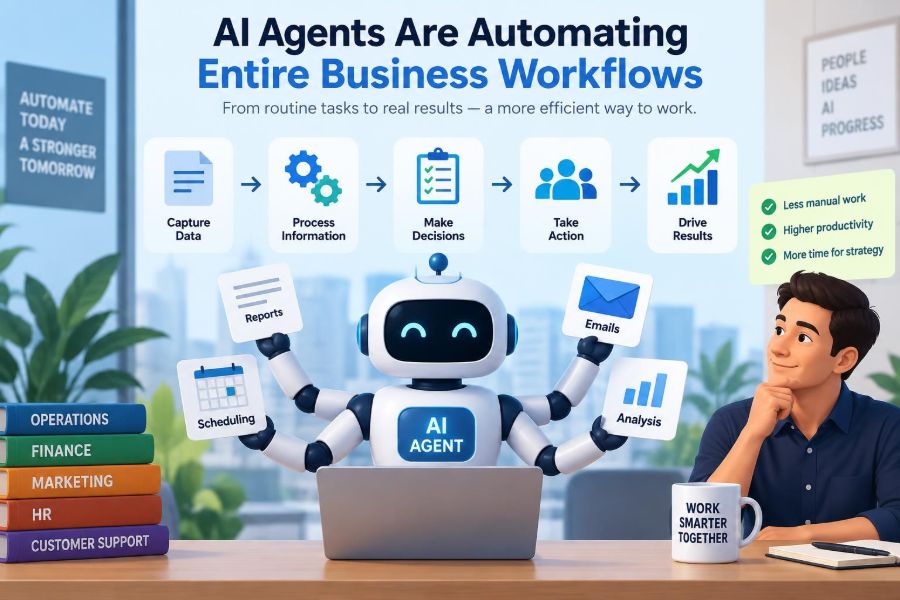
AI agents are attracting attention because they are designed to handle more of that middle ground. Rather than merely completing one pre-programmed action, an agent can work toward a goal: gather information, choose from permitted actions, use software tools, and report what happened.
That does not mean businesses can safely hand over every decision. It does mean managers have a new way to redesign workflows—and a new responsibility to decide where automation belongs, where human judgment remains essential, and how both can work together.
🤖 What an AI Agent Actually Is
An AI agent is a software system that can pursue a defined objective by taking a sequence of actions. It commonly uses a language model to interpret instructions and information, but it also needs access to tools such as databases, email, calendars, enterprise applications, or approved web services.
A useful distinction is that a chatbot mainly responds to prompts, while an agent can act within a workflow. For example, a chatbot may explain a return policy; an agent may identify an eligible order, create a return label, update the customer record, and send a carefully approved message.
Its apparent independence should not be confused with unrestricted autonomy. In a well-managed business setting, agents operate within permissions, policies, budgets, escalation rules, and logs.
🧩 Why Workflows Are the Real Unit of Change
Most business value does not come from one isolated task. It comes from a workflow: a connected set of steps that moves work from a trigger to an outcome. Think of hiring, invoice processing, incident response, customer onboarding, or monthly forecasting.
These workflows often contain hidden costs. Employees re-enter the same data, chase approvals, search for context in multiple systems, and wait for handoffs. AI agents aim to connect those steps rather than simply making an individual step faster.
The management question is therefore not, “Where can we add AI?” It is, “Which workflow produces delays, errors, or poor employee and customer experiences—and why?”
🔄 From Traditional Automation to Agentic Work
Traditional automation follows explicit instructions: if a form field has a certain value, send an email; if an invoice matches a purchase order, mark it for payment. This works extremely well when inputs are structured and exceptions are limited.
Agentic automation adds the ability to interpret less structured material and choose among allowed next steps. An agent may read an email, classify its request, retrieve a policy, identify missing details, and decide whether to resolve the case or send it to a person.
The difference is not that agents replace rules. Mature workflows usually combine both. Rules provide consistency and safeguards; agent reasoning helps when language, context, and exceptions make rigid branching impractical.
🧠 The Basic Anatomy of an Agent
Although designs vary, business agents usually have several components. The language model helps interpret requests and generate responses. A set of instructions defines the role, boundaries, tone, and decision criteria.
Tool connections let the agent retrieve or change information. Memory may preserve relevant context during a case or, where permitted, maintain useful preferences over time. Finally, an evaluation and monitoring layer checks whether the agent behaved as intended.
- Goal: the business outcome the agent is trying to achieve.
- Context: data, documents, policies, and conversation history it may use.
- Tools: approved actions such as searching records or creating a ticket.
- Guardrails: limits on decisions, access, spending, and communications.
- Escalation: conditions that require human review.
🎯 Goals Must Be More Specific Than “Help the Customer”
Vague goals create vague behavior. “Resolve customer issues” sounds sensible but leaves unanswered questions: What counts as resolution? Which remedies are allowed? When should the agent ask a clarifying question? When must it escalate?
Better objectives describe an outcome and its constraints. For example: “For eligible standard returns, create a return request, provide instructions, and update the case record; escalate disputed charges, high-value orders, or requests outside the published policy.”
This level of precision benefits people as well as systems. Clear workflow design exposes disagreements that were previously hidden in informal judgment.
🗺️ Start by Mapping the Current Process
Before deploying an agent, map the actual workflow—not the idealized version in a policy document. Follow one case from trigger to completion and record systems used, handoffs, approval points, exceptions, delays, and rework.
Ask frontline employees where they search for information, what they copy and paste, and which situations demand a manager’s interpretation. These details reveal whether the problem is automation-ready or whether the process itself is unclear.
A process map also establishes a baseline. Without one, a team may celebrate a fast demonstration while missing that the agent has shifted work, risk, or error correction elsewhere.
🔎 Choose Processes with the Right Shape
The strongest early candidates are frequent workflows with recognizable patterns, accessible data, and clear boundaries. They should create enough friction to justify change but not carry consequences so severe that experimentation is irresponsible.
Examples may include routing internal requests, preparing first drafts of routine reports, gathering onboarding documents, categorizing supplier inquiries, or resolving narrowly defined support cases. These are examples of possible use cases, not evidence that every organization should automate them.
Processes that depend on incomplete records, unresolved policy conflicts, or highly sensitive discretionary decisions need more preparation. An agent cannot reliably compensate for a fundamentally broken process.
📥 Customer Service: A Practical Workflow Example
Consider a hypothetical online retailer receiving “Where is my order?” messages. An agent can identify the customer after verification, retrieve shipment status, compare it with expected delivery information, and draft a response using approved language.
If the package is delayed beyond a defined threshold, it might offer only the remedies authorized by policy. If the tracking data conflicts, the customer alleges fraud, or the case involves a vulnerable customer, the agent should create a well-documented escalation for a human specialist.
The valuable outcome is not merely faster replies. It is fewer unnecessary searches, more consistent records, and human attention directed toward exceptions that genuinely need it.
🧾 Finance Workflows Need Tighter Boundaries
Finance teams often see obvious opportunities because invoice and expense processes contain repeated checks. An agent can extract information from documents, compare fields against internal records, flag mismatches, and prepare an approval packet.
However, financial actions can create material consequences. An agent that suggests coding or identifies likely duplicates is different from one that releases payment or changes supplier bank details. The latter requires much stronger controls and independent verification.
A sensible design separates preparation, recommendation, approval, and execution. Automating the first two stages may generate value while keeping accountable authority with designated employees.
👥 HR Support Is Helpful but Sensitive
Human resources workflows contain many repetitive questions: leave procedures, benefit enrollment steps, onboarding schedules, policy navigation, and document collection. An agent can make these answers easier to find and can coordinate routine reminders.
Yet HR data is sensitive, and employment decisions may carry legal, ethical, and personal consequences. Systems should not make opaque judgments about hiring, discipline, performance, or accommodation without careful governance and qualified human involvement.
For many organizations, the best HR agent is a guided service assistant: it explains approved policy, gathers information, and routes cases appropriately rather than acting as an unreviewed decision-maker.
📣 Sales Operations Can Reduce Administrative Drag
Sales representatives frequently spend time updating customer relationship management records, preparing account summaries, coordinating follow-ups, and locating approved product information. An agent can assemble these materials and prompt the right next action.
For instance, after a meeting note is approved or submitted, an agent might extract action items, update relevant fields, create follow-up tasks, and draft a recap for the representative to review. This preserves the salesperson’s ownership of the relationship.
Organizations should avoid allowing agents to invent claims, pricing commitments, or contractual promises. Customer-facing messages need approved source material, clear review requirements, and an accurate record of what was sent.
🏭 Operations Agents Coordinate Across Systems
Operational work is often distributed across inventory, scheduling, logistics, maintenance, and service systems. That fragmentation makes it a natural target for agents that can gather context from several approved sources and identify the next best action.
A hypothetical facilities agent might receive a maintenance report, check equipment history, determine whether the issue matches an existing work order, schedule an available technician, and notify the requester. It should not override safety procedures or dispatch emergency work without the controls the situation demands.
The central benefit is coordination. Agents can reduce the time spent translating one system’s status into another person’s next task.
🪜 Break a Workflow into Actionable Steps
“Automate onboarding” is too large a project statement. Decompose it into trigger, verification, data collection, document creation, access requests, notifications, approvals, completion checks, and exception handling.
Each step should be classified. Is it deterministic and rule-based? Does it require interpretation of text? Does it require a human decision? Does it touch confidential data or create an external commitment?
This decomposition prevents a common failure: trying to build one all-purpose agent when a sequence of smaller automations, reviews, and specialized agents would be safer and easier to improve.
🔗 Tools Turn Language into Business Action
An agent becomes operational when it can use tools. In technical terms, a tool may be an application programming interface, or API: a controlled way for one system to request information or perform an action in another system.
Tool access should be narrow and purposeful. An invoice-review agent may need permission to read purchase orders and create an exception case, but not to alter vendor master data. A support agent may create a refund request but not directly issue unlimited refunds.
Good tool design also asks the agent to confirm important details before acting. The more consequential the action, the more explicit and auditable the confirmation should be.
🧱 Use Guardrails as Operating Design
Guardrails are the practical limits that shape what an agent can do. They include system instructions, permission controls, approved knowledge sources, spending thresholds, mandatory fields, prohibited actions, and human approval gates.
They should not rely solely on a written instruction such as “do not disclose confidential information.” The surrounding system must enforce access restrictions and prevent unauthorized actions even if the agent produces an incorrect or unsafe response.
Think of guardrails like lanes, signals, and barriers on a road. Driver guidance matters, but physical and procedural controls are necessary when mistakes could cause harm.
👤 Human-in-the-Loop Is a Design Choice
A human-in-the-loop workflow requires a person to review or approve specific agent outputs. It is particularly useful where decisions have financial, legal, reputational, safety, or people-related effects.
Human review should be focused, not symbolic. If reviewers receive hundreds of unclear agent recommendations, they may approve them mechanically. A useful review screen shows the proposed action, supporting evidence, confidence signals where available, policy basis, and a clear way to correct the outcome.
Over time, teams may move low-risk cases to automatic execution after testing. That should follow demonstrated reliability and a deliberate risk decision, not pressure to appear fully autonomous.
⚖️ Match Oversight to the Consequence
Not every workflow deserves the same control level. A simple framework helps managers align oversight with potential harm and reversibility.
| Workflow type | Typical agent role | Appropriate oversight |
|---|---|---|
| Low consequence, reversible | Draft, classify, route | Sampling and monitoring |
| Moderate consequence | Prepare action or recommendation | Human approval for defined cases |
| High consequence or sensitive | Gather evidence and support staff | Qualified human decision and strong access controls |
This is not a legal or compliance framework on its own. Organizations may face sector-specific obligations, contractual requirements, or internal policies that require additional controls.
🔐 Data Access Is a Management Issue, Not Just an IT Issue
Agents are only as trustworthy as the data and permissions surrounding them. If they can see outdated records, conflicting documents, or excessive personal information, their outputs may be wrong, inappropriate, or both.
Managers should define what data the agent needs, where the authoritative version resides, how long information is retained, and who can inspect logs. The principle of least privilege—giving only the access necessary for a task—is especially valuable.
Data classification matters too. Public product information, internal operating procedures, customer records, and sensitive employee data should not receive identical treatment.
🧪 Test for Exceptions, Not Only Happy Paths
A polished demonstration usually follows the easy path: clean data, a simple request, and an obvious outcome. Real work includes misspellings, conflicting records, angry customers, incomplete forms, system outages, and requests that fall outside policy.
Testing should deliberately include those cases. Teams can create a controlled set of representative scenarios, define the correct result or escalation for each, and inspect whether the agent uses tools, citations, and permissions appropriately.
Testing also needs to examine failure behavior. A safe agent says it cannot complete an action and routes the issue; an unsafe one guesses, silently fails, or gives a confident but unsupported answer.
📏 Measure Workflow Outcomes, Not Just Model Output
Managers should measure whether the workflow improved, not merely whether an agent produced fluent text. Useful indicators may include completion time, rework, escalation rate, error types, customer effort, employee satisfaction, policy adherence, and cost of handling a case.
Metrics need interpretation. A lower escalation rate can signal better resolution, or it can indicate that the agent is failing to recognize cases that need help. Pair numerical measures with case reviews and feedback from the people affected.
Establish a baseline before rollout where possible. Otherwise, seasonal demand, staffing changes, or a redesigned process can be mistakenly credited to the agent.
📚 Build Knowledge That Can Be Used Reliably
Many business agents need to search internal knowledge rather than depend on general model knowledge. This commonly involves retrieving relevant policy pages, product documents, or procedure notes at the moment a question is asked.
For this to work, documents need owners, version control, understandable language, and clear status. A messy shared folder with contradictory files does not become reliable simply because an agent can search it quickly.
Where possible, require the agent to base sensitive answers on approved sources and expose the source or policy reference to reviewers. This makes correction easier and reduces unsupported improvisation.
🗣️ Design Clear Escalation Paths
Escalation is not an admission that automation failed. It is a core feature of responsible workflow design. The agent should recognize triggers such as missing information, contradictory records, high-value transactions, complaints involving harm, unusual requests, or low confidence in its next action.
When it escalates, it should hand over a useful package: the customer’s request, verified facts, actions already attempted, relevant policy information, and a concise explanation of why review is needed.
Nothing frustrates employees more than receiving an opaque “please handle” ticket. Good escalation reduces investigation time rather than simply moving work downstream.
🧑💼 Managers Must Redesign Roles, Not Merely Remove Tasks
When agents handle routine coordination, human work often shifts toward judgment, relationship management, exception resolution, quality review, and process improvement. Those roles require training and explicit expectations.
Employees may reasonably worry that automation is being introduced without clarity about workload, accountability, or career development. Leaders should explain what will change, invite frontline input, and avoid treating staff knowledge as an obstacle to overcome.
In practice, the people doing the work often know where a workflow breaks. Involving them improves system design and helps identify risks that process diagrams miss.
🚫 Common Mistake: Automating a Bad Process
An agent can make a poor process move faster, but speed does not create value when the underlying rules are unclear or unnecessary. If five approvals exist because no one trusts the data, automating reminders for all five does not solve the actual problem.
Before automation, remove obsolete steps, clarify ownership, standardize inputs, and decide which exceptions truly need special treatment. This is classic process improvement, and it remains essential in an AI-enabled organization.
A smaller, cleaner workflow is easier to automate, audit, and explain to customers and employees.
🎭 Common Mistake: Giving One Agent Too Much Authority
It is tempting to imagine a single digital employee that manages a whole department. In reality, broad permissions create broad risk. An agent may misunderstand a request, use the wrong tool, or combine individually harmless actions into a harmful result.
Use separation of duties where it matters. One component can collect information, another can validate it against rules, and a person or tightly controlled service can authorize the irreversible action.
This approach may feel less dramatic, but it reflects sound management: authority should match competence, evidence, and accountability.
🧯 Common Mistake: Ignoring Error Recovery
Every workflow needs a recovery plan. What happens if the agent creates a duplicate ticket, sends an incorrect draft, updates the wrong field, or encounters an unavailable system? Who notices, who can reverse the action, and how is the affected person informed?
Designing reversibility is especially useful in early deployments. Prefer actions that can be reviewed, corrected, or cancelled before allowing irreversible commitments such as payments, contract changes, or permanent record deletion.
Logs are vital here. They should show what information the agent used, which tools it called, what action occurred, and who approved exceptions.
🌱 Begin with a Narrow Pilot
A focused pilot lets an organization learn without turning one experiment into a company-wide dependency. Select one workflow slice, define eligible cases, name a business owner, set safeguards, and agree on success and stop criteria.
Run the process alongside existing methods when feasible. Compare outputs, inspect errors, listen to users, and revise instructions, knowledge sources, and controls before expanding scope.
A pilot should answer practical questions: Does it reduce work? Does it improve the experience? What new risks appear? Can staff understand and correct its decisions? These lessons matter more than an impressive first demonstration.
📈 Scale Through Standards, Not Copy-and-Paste
Once a pilot works, scaling requires repeatable capabilities: identity management, approved tool connections, security review, monitoring, documentation, incident handling, and a method for evaluating changes. Without these foundations, every new agent becomes a separate risk project.
Organizations also benefit from reusable patterns. A standard approval gate, audit log format, escalation template, and knowledge-source review process can accelerate future projects while maintaining control.
Central standards should not erase local knowledge. Business teams need enough ownership to define outcomes and exceptions, while technical, risk, and governance teams provide the shared infrastructure.
🔮 What “Entire Workflow Automation” Really Means
The phrase can sound as though a business process disappears into a black box. In most responsible implementations, it means something more practical: the agent coordinates a chain of low- and medium-risk tasks, while systems enforce rules and people retain ownership of consequential decisions.
The breakthrough is not that management becomes unnecessary. It is that managers can redesign work around outcomes instead of manual handoffs. Employees can spend less time moving information and more time handling ambiguity, relationships, and improvement.
That promise will be realized unevenly. Workflows with reliable data, clear policy, good systems, and thoughtful oversight will advance faster than processes built on ambiguity and informal workarounds.
🧭 The Core Management Principle
AI agents should be treated as participants in a managed operating system, not as magic software purchases. Their value depends on process design, data quality, permissions, human accountability, and continuous learning.
The most effective question for leaders is not “Can the agent do this?” It is “What level of autonomy is appropriate for this action, given its consequences, evidence, reversibility, and the people affected?”
Answer that question carefully, and AI agents can become useful workflow partners rather than ungoverned sources of speed and risk.
Successful AI workflow automation combines capable agents with clear processes, narrow authority, meaningful human oversight, and measurable business outcomes. That is how organizations turn a promising technology into dependable management practice. 📊🤖🌱