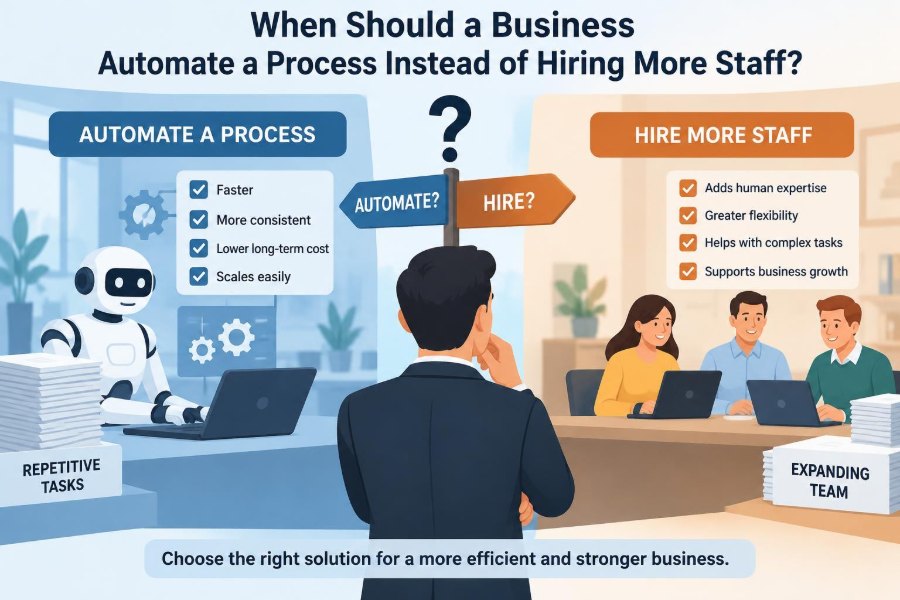

A customer-service inbox is filling faster than a small team can answer it. Orders are being copied from one system into another, invoices are waiting for approval, and managers are spending late evenings updating spreadsheets. The immediate response is often obvious: hire another person.
Sometimes that is exactly the right decision. A capable employee can solve ambiguous problems, reassure a frustrated customer, spot a quality issue, and improve a process that does not yet work well.
But adding people to a repetitive, rules-based bottleneck can simply make the bottleneck more expensive. If the work can be completed through consistent steps and reliable data, automation may create capacity without creating another layer of handoffs and supervision.
The question is not whether technology is better than people. It is whether a particular process needs human judgment, human relationships, or repeatable execution. Making that distinction well is a core business-management skill.
🔎 Start With the Process, Not the Job Title
Businesses sometimes frame the decision as “software versus an employee.” That framing is too broad. Most roles contain a mixture of activities: answering exceptions, entering data, checking records, resolving problems, and communicating with people.
Break the role into individual workflows. A payroll coordinator may need human expertise for unusual deductions and employee questions, while routine timesheet reminders and data transfers may be automated. This approach protects the value of the role instead of treating the whole job as a cost to remove.
⚙️ What Business Process Automation Means
Business process automation uses software, rules, integrations, or machines to carry out defined tasks with limited manual intervention. A simple example is an online form that creates a support ticket, assigns it to the correct queue, and sends an acknowledgement.
Automation ranges from basic templates and spreadsheet rules to workflow platforms, robotic process automation, and systems that use machine learning. The technology matters less than the outcome: a process moves reliably from one step to the next.
🧭 The First Test: Is the Work Repetitive?
Repetition is a strong signal, but it is not enough on its own. A task is a good candidate when people perform substantially the same sequence again and again: receive an input, check a condition, update a system, and send a standard response.
For example, copying approved purchase-order details into an accounting system hundreds of times a month is repetitive. Negotiating a new supplier agreement may involve similar stages, but each discussion requires context and trade-offs that a fixed workflow cannot fully handle.
📏 Look for Clear Rules and Stable Decisions
Automation works best where instructions can be expressed as dependable rules. “If the invoice matches the purchase order and delivery record, send it for approval” is clearer than “decide whether this supplier relationship seems valuable.”
Ask whether two trained employees would usually make the same decision from the same information. If the answer is yes, the decision may be suitable for automation. If answers vary because the situation requires interpretation, escalation rules may be safer than automatic action.
🗂️ Clean Data Is a Prerequisite, Not a Luxury
Software can move poor data very quickly. Duplicate customer records, inconsistent product codes, missing fields, and unclear ownership make an automated workflow unreliable.
Before automating, identify where information originates, who can change it, and which system is the authoritative record. Data cleanup can feel less exciting than buying a tool, but it often determines whether the project succeeds.
🔁 High Volume Changes the Economics
A task completed once a month may not justify setup, testing, maintenance, and training. The case becomes stronger when a stable task occurs frequently or arrives in large batches.
Volume is not merely about the total number of transactions. Consider peaks as well. A retailer that receives most returns after a seasonal promotion may benefit from automated status updates even if its annual average volume seems modest.
⏱️ Measure Time per Transaction and Total Time
Managers should observe the actual work rather than rely on estimates. Record the average handling time, rework time, waiting time, and the number of people involved. A two-minute task can consume substantial capacity when it occurs thousands of times.
Also distinguish active work from delay. Automation may not shorten a manager’s approval decision, but it can immediately route the request, notify the approver, and prevent it from disappearing in an inbox.
💰 Compare Total Costs, Not Just Salaries
A hiring decision includes more than wages. Recruitment, onboarding, benefits, workspace, equipment, management time, training, turnover risk, and quality control can all affect the true cost of additional capacity.
Automation has its own full cost: process design, software licenses, integration, security review, testing, staff training, support, and future changes. A sound comparison looks at these costs over a realistic period rather than assuming either option is free after the first month.
📊 Build a Simple Automation Business Case
A business case does not need false precision. It should make assumptions visible and show what would need to be true for the investment to make sense.
| Question | What to examine |
|---|---|
| Capacity | Hours currently spent, transaction volume, and expected growth |
| Quality | Error types, rework, missed deadlines, and customer impact |
| Cost | Implementation, recurring software, support, and labor costs |
| Risk | Data sensitivity, compliance needs, failure consequences, and controls |
| Alternatives | Process redesign, temporary help, outsourcing, or a partial automation pilot |
The goal is not to prove automation at all costs. It is to compare credible choices and make the trade-offs explicit.
✅ Use Automation to Reduce Preventable Errors
Manual work is not automatically poor work, but repetitive copying and checking create opportunities for slips. A workflow can validate mandatory fields, prevent invalid dates, calculate standard values, and retain an audit trail.
That said, automation can repeat a design error consistently and at scale. Build validation checks, exception queues, and a way to pause the workflow when unexpected patterns appear.
🚨 Consider the Cost of Mistakes
Not every error has the same consequence. A typo in an internal meeting reminder is annoying; a wrong payment, customer record, or safety instruction may be serious.
High-consequence work can still be automated, but it usually needs stronger controls. These may include approval thresholds, separation of duties, logs, access restrictions, and human review before irreversible actions occur.
👥 Hire When Judgment Is the Main Value
Hiring is often the better choice when the work depends on empathy, negotiation, creative judgment, relationship building, or the ability to define an unclear problem. These are not minor exceptions; they are central to many valuable roles.
A business-development professional, senior adviser, people manager, or complex-case support specialist may use tools extensively, but their contribution lies in reading context and making choices where the rules are incomplete.
💬 Customer Experience Is Not Fully Scripted
Automatic confirmations, appointment reminders, order tracking, and answers to common questions can improve service by being fast and consistent. Customers usually appreciate not having to wait for a person to perform a simple lookup.
However, a customer facing a billing dispute, bereavement, service failure, or unusual request may need a person with authority and empathy. Good service design makes the route to a human clear instead of trapping people in a loop.
🧠 Complex Exceptions Need an Owner
Every useful automated process should define what happens when the standard path fails. An address may not validate, a document may be unreadable, or two systems may report conflicting values.
Create an exception queue with named ownership, priority rules, and enough context for a person to resolve the issue. If exceptions are common, that is evidence the underlying process is not ready for broad automation.
🛠️ Fix a Broken Workflow Before Automating It
Automating an inefficient process can lock its flaws into software. If an approval requires four signatures because no one trusts the information, adding automated routing does not address the trust problem.
Map the current workflow and ask basic questions: Which steps add value? Which approvals are necessary? Where is information re-entered? Could the form be simplified? Often, process redesign delivers benefits even before new technology is introduced.
🧩 Choose the Right Level of Automation
The choice is rarely all or nothing. A sensible first step may be a template, a shared intake form, automated notifications, or an integration between two systems rather than a large platform rollout.
- Assistive automation helps an employee work faster, such as suggested responses or prefilled fields.
- Workflow automation routes work and applies stated rules while people handle decisions.
- End-to-end automation completes a process with limited human involvement and needs the strongest controls.
Select the lowest level that solves the actual capacity or quality problem.
🔗 Integration Can Matter More Than Features
A powerful tool creates little value if employees must export files, paste data, and reconcile records manually. The most useful automation often connects systems that already hold the right information.
Check whether systems can exchange data reliably, whether identifiers match, and what happens when one system is unavailable. Integration planning should include monitoring, not just the initial connection.
🔐 Protect Data, Access, and Privacy
Automated workflows may process customer details, employee information, payment data, or commercially sensitive records. Managers should understand where data is stored, who can access it, and whether access is appropriate for each task.
Security, privacy, contractual, and regulatory obligations vary by location and industry. Where sensitive information is involved, obtain appropriate internal or specialist advice rather than assuming a popular software product meets every requirement.
🧾 Preserve Accountability and an Audit Trail
When an automated action changes a record, sends a message, or approves a transaction, the business should be able to understand what happened. Logs can show the input received, rule applied, time of action, and any human override.
This visibility helps with troubleshooting and accountability. It also prevents the common problem of a process becoming a “black box” that no one feels able to question or improve.
📈 Forecast Demand Before Adding Capacity
Automation is particularly attractive when demand is likely to grow in a predictable way. A process that scales mainly by adding more manual steps can become difficult to manage as volume increases.
But forecasts are uncertain. If a short-lived campaign, seasonal spike, or temporary backlog is causing pressure, temporary staff or revised priorities may be more sensible than building a permanent automated system around an unusual event.
🌊 Separate a Backlog From a Permanent Need
A backlog can make any solution feel urgent. First determine whether the work is arriving faster than it can be processed, or whether a one-time disruption created a pile-up.
For a temporary backlog, extra shifts, contracted support, or a focused cleanup project may restore service quickly. For an ongoing mismatch between demand and capacity, automation, hiring, or both deserve a more durable analysis.
🧪 Pilot the Workflow Before Scaling
A pilot tests a narrow, representative part of the process with clear boundaries. For instance, a company could automate standard invoice matching for one business unit while leaving unusual cases with the existing team.
Define success measures before the pilot begins. These might include completion time, error rate, percentage of cases requiring intervention, staff experience, and customer outcomes. A pilot should reveal limitations, not hide them.
📌 Set Meaningful Performance Measures
Speed is useful, but it is not the only measure. A workflow that closes support tickets rapidly while leaving customers unresolved is not genuinely improving service.
Use a balanced view that fits the process: turnaround time, error correction, compliance checks, customer satisfaction signals, employee workload, and cost per completed transaction. Review unintended effects alongside the headline metric.
👩💼 Redesign Roles Rather Than Simply Removing Tasks
When automation takes routine work away, employees can spend more time on exceptions, customer conversations, analysis, improvement, and revenue-generating activity. That outcome requires deliberate role design and training.
If leaders automate tasks without explaining what changes next, staff may understandably see the project as a threat. Involving employees often improves the design because they know the workarounds, edge cases, and customer frustrations that a process map misses.
🎓 Plan for Skills, Training, and Adoption
Automation shifts work; it does not eliminate the need for capability. Teams may need to interpret dashboards, resolve exceptions, manage vendors, test changes, and understand when a result should be questioned.
Provide practical training close to launch, written procedures for common issues, and a clear route for feedback. Adoption is stronger when people see how the new workflow reduces avoidable work rather than adding hidden administrative burdens.
⚖️ Avoid Treating Labor and Technology as Opposites
Many growing businesses need both more people and better automation. Automating order entry may release capacity, while hiring an account manager improves retention and expands customer relationships. These investments solve different constraints.
The best question is: where does the next unit of investment create the most valuable capacity? That may mean technology for predictable transactions and people for work where judgment changes the outcome.
🚩 Common Signs a Business Is Automating Too Soon
Warning signs include constantly changing rules, unreliable data, high exception rates, unclear process ownership, or no agreement on what a successful outcome looks like. In those conditions, software may create more confusion rather than less.
Another warning sign is choosing a tool before defining the problem. A feature list cannot substitute for a clear workflow, accountable owner, and realistic plan for maintenance.
🧯 Common Signs Hiring Alone Is Masking the Problem
Hiring may be masking a process problem when new employees spend much of their time copying information, chasing routine approvals, correcting avoidable errors, or answering the same simple question repeatedly.
This does not mean the existing staff are inefficient. It often means the system depends on human effort to bridge gaps between outdated processes. Addressing those gaps can make future hiring more purposeful.
🗺️ A Practical Decision Sequence
- Define the customer or business outcome the process must deliver.
- Map the current steps, systems, delays, errors, and exception types.
- Measure volume, handling time, quality impact, and likely demand changes.
- Decide which steps require judgment and which follow stable rules.
- Redesign unnecessary steps before selecting technology or opening a role.
- Compare full costs, risks, and expected benefits of hiring, automation, and a hybrid option.
- Pilot the smallest viable solution, then review results before scaling.
This sequence slows down an impulsive decision, but it usually speeds up the path to a solution that will last.
🏁 The Core Principle: Automate Execution, Invest in Judgment
A business should automate when work is frequent, rules-based, data-ready, and expensive or risky to perform manually, with well-managed exceptions. It should hire when the work’s value comes primarily from judgment, relationships, creativity, complex problem-solving, or accountable decision-making.
The strongest operating models combine both. They use systems to handle predictable execution and give people the time, information, and authority to handle what is uncertain, sensitive, or genuinely human.
Choose automation to make repeatable work reliable, and choose people where understanding and judgment make the difference. That is a more useful rule than treating either hiring or technology as the automatic answer. 📊🤝