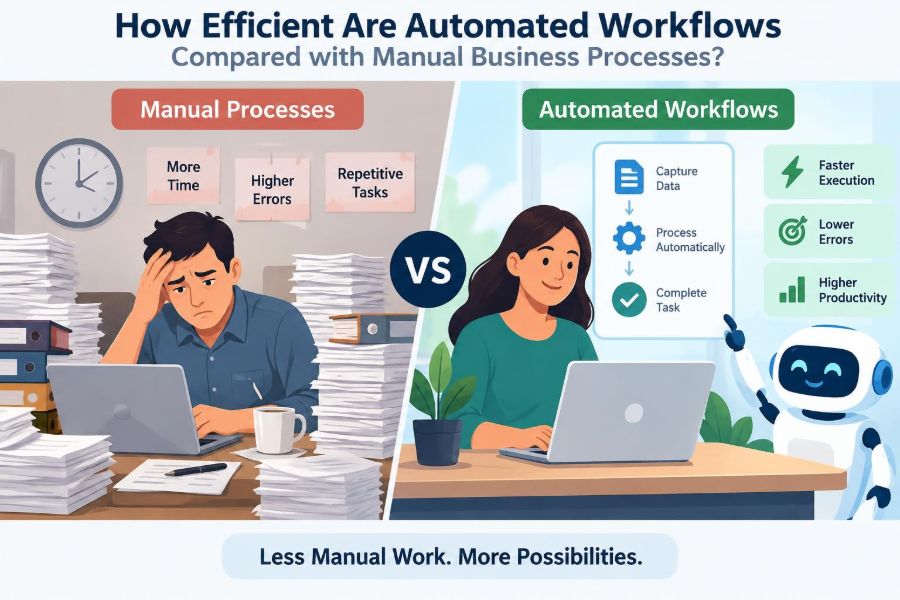

A customer submits a request on Friday afternoon. One employee copies the details into a spreadsheet, another checks stock, a manager approves an exception by email, and someone eventually sends an update on Monday. Nothing is necessarily wrong with this process—but every handoff creates a chance for delay, confusion, or an overlooked message.
Now imagine the same request triggering a structured sequence: the information is captured once, stock is checked automatically, exceptions are routed to the right manager, and the customer receives a status update. The work has not disappeared. Instead, routine decisions and data movement have been organized into a repeatable workflow.
That contrast explains why workflow automation attracts so much attention in business management. Leaders want lower operating friction, while employees want less repetitive administration and more time for work that needs judgment.
Yet automation is not automatically more efficient. A poorly designed automated process can move mistakes faster, frustrate customers, and make exceptions harder to handle. Comparing automated and manual business processes requires looking beyond speed alone.
🔎 What Counts as a Business Workflow?
A business workflow is the ordered path work follows to produce an outcome. It includes a trigger, a set of actions, decisions, handoffs, and an endpoint.
For example, an employee expense claim may move from submission to receipt checking, manager approval, finance review, payment, and record storage. A workflow can be formal and documented, or informal and held together by habits, inboxes, and verbal reminders.
Automation applies technology to some or all of these steps. It does not necessarily mean replacing people; it often means coordinating their work more reliably.
✋ How Manual Processes Actually Work
Manual processes depend on people to enter information, interpret rules, send messages, make decisions, and update records. They can operate through paper forms, email, spreadsheets, phone calls, or business software used without automated routing.
Manual work is often highly adaptable. An experienced employee can notice an unusual customer need, ask a clarifying question, and depart from the usual sequence when circumstances justify it.
The cost is variability. Two capable people may process the same request differently, especially when instructions are unclear or workload is high.
⚙️ What an Automated Workflow Does
An automated workflow uses predefined rules, integrations, and task assignments to move work forward. A form submission might create a record, validate required fields, assign an owner, set a due date, and notify the next person without anyone manually coordinating those actions.
Some workflows are fully automated, such as sending a standard confirmation email. Others are human-in-the-loop: software handles routine routing and checks, while people approve, investigate, negotiate, or decide.
The distinction matters because most useful business automation is not an all-or-nothing choice.
📏 Efficiency Means More Than Finishing Faster
Speed is one dimension of efficiency, but it is not the whole picture. A process is efficient when it achieves a suitable result with appropriate use of time, labor, money, information, and managerial attention.
A rapid workflow that generates incorrect invoices creates rework. A slower manual review may be justified when the decision affects a large contract, a safety concern, or a sensitive employee matter.
Useful comparisons therefore consider both process performance and outcome quality.
⏱️ Processing Time and Waiting Time
Automation is usually strongest at reducing waiting time between predictable steps. A system can pass a completed task to the next queue immediately, including outside normal office hours.
Manual processes often contain hidden delays: an email waits unread, a manager is travelling, or an employee cannot begin because a document is missing. The actual task may take five minutes, while the request sits for two days.
Automation cannot remove every delay. It can, however, expose where work is waiting and issue reminders or escalation alerts when agreed deadlines are missed.
🔁 Consistency in Repetitive Tasks
When the same rules apply repeatedly, automation delivers a level of consistency that manual execution finds difficult to sustain. It can require mandatory fields, apply the same calculation, and route requests using the same criteria every time.
This is particularly useful for tasks such as onboarding checklists, recurring reports, order acknowledgements, and standard approval flows. Consistency makes service easier to predict for customers and easier to manage internally.
But a rule is only consistently helpful if it is correct. Automating an outdated policy makes the outdated policy more deeply embedded.
🧮 Error Reduction—and Error Amplification
Manual data entry creates opportunities for transcription mistakes, duplicate records, missed attachments, and incorrect calculations. Automation can reduce these risks by transferring data directly between approved systems and validating entries before processing.
However, automation introduces a different risk: a flawed rule, mapping, or integration can affect many transactions before anyone notices. Manual errors are often isolated; automated errors may be systematic.
Controls should include test cases, approval of rule changes, exception reports, and a clear method to pause a workflow when a serious problem appears.
💰 Understanding the Cost Comparison
Manual processes may appear inexpensive because the business already employs the people performing them. That view misses the cumulative cost of repetitive handling, supervision, rework, training, and delays.
Automation has upfront costs: process mapping, configuration, integration, testing, documentation, and ongoing maintenance. Some workflows also require new software subscriptions or specialist support.
The sensible question is not whether automation is free. It is whether the total cost of building and maintaining it is justified by the volume, risk, and value of the work it improves.
📊 A Practical Way to Compare Options
| Factor | Manual process | Automated workflow |
|---|---|---|
| Routine speed | Depends on staff availability | Often immediate between system steps |
| Flexibility | High for unusual cases | High only when exceptions are designed in |
| Consistency | Varies by person and workload | Strong for defined rules |
| Setup effort | Usually low initially | Requires design, testing, and maintenance |
| Visibility | Can be scattered across inboxes | Can provide status and audit records |
| Failure pattern | Individual mistakes or bottlenecks | Potentially broad impact from faulty rules |
This comparison is a guide, not a verdict. The same process may need both approaches at different stages.
🧠 Where Human Judgment Remains Essential
Judgment is needed when information is ambiguous, values conflict, relationships matter, or the consequences of a decision are difficult to reduce to rules. Hiring decisions, complex customer complaints, strategic purchasing, and performance conversations are common examples.
A workflow can collect information and schedule reviews, but it should not pretend that a nuanced decision is merely a checkbox. Over-automation can make people feel unheard and can conceal weak reasoning behind a system output.
Use automation to prepare people for judgment, not to remove accountability for decisions that require it.
📬 Customer Experience at the Point of Handoff
Customers often judge a process by clarity and responsiveness rather than by its internal technology. Automated confirmations, status updates, and appointment reminders can reduce uncertainty without requiring staff to send repetitive messages.
Problems arise when customers cannot reach a person after an automated path fails. A delivery exception, billing dispute, or unusual request should have a visible route to human support.
The efficient design is not the one with the fewest human interactions. It is the one that gives customers timely help at the moments where it matters.
🏗️ Process Design Comes Before Technology
Automating a confusing process rarely fixes it. It often turns informal workarounds into rigid steps and makes their flaws harder to see.
Before selecting a tool, map the current workflow: identify the trigger, inputs, decisions, responsible roles, systems used, outputs, and common exceptions. Ask which steps create value and which only compensate for missing information or unclear ownership.
Simplify first, automate second. Removing an unnecessary approval may create more value than automating the approval request.
🗺️ Finding Suitable Automation Candidates
Good candidates tend to be frequent, rules-based, stable, and time-consuming. They also have clear inputs and outcomes that can be checked.
- Routing service requests to the appropriate team
- Creating tasks after a new employee accepts an offer
- Matching standard purchase requests against approved limits
- Sending reminders for incomplete compliance documentation
- Generating recurring operational reports from reliable data
A task being unpopular does not automatically make it a good automation target. If it is rare, constantly changing, or based on subtle interpretation, building automation may cost more than it saves.
🚦 Volume, Variability, and Risk
Three questions help prioritize a workflow. How often does it occur? How much does each case vary? What happens if it goes wrong?
High-volume, low-variability work with manageable exceptions is often a strong starting point. Low-volume, high-risk work may still benefit from digital tracking, but full automation may be inappropriate without careful review.
A payroll adjustment illustrates the point. The surrounding administration can be automated, while the final authorization for an unusual change may remain deliberately human.
🔗 Data Quality Determines Workflow Quality
Automation depends on usable data. If customer records contain duplicates, product codes are inconsistent, or ownership fields are incomplete, automated routing will produce unreliable results.
This is often called “garbage in, garbage out,” but the practical lesson is more constructive: define who owns critical data, validate it near the point of entry, and correct recurring sources of error.
Data cleanup is not glamorous, yet it is frequently the work that makes automation dependable.
🔌 Integration Can Remove Duplicate Effort
An integration allows approved systems to exchange information. For example, a completed sales order may update inventory, create a finance record, and initiate fulfilment tasks without staff retyping the same details.
Done well, integration reduces duplicate entry and delays. Done carelessly, it can spread incorrect data across multiple systems quickly.
Businesses should be clear about the source of truth for each important field. If two systems can both overwrite a customer address, staff need to know which record governs the process.
🛡️ Controls, Security, and Audit Trails
Efficient workflows must still protect sensitive information and prevent unauthorized actions. Role-based access, approval limits, separation of duties, and secure handling of credentials are operational necessities, not optional extras.
Automation can improve control by recording who approved a step, when a status changed, and which rule triggered an action. These records are useful for investigations, internal reviews, and process improvement.
At the same time, organizations should avoid granting automated tools broad permissions simply because integration is convenient.
🚨 Exception Handling Is the Real Test
Every process has cases that do not fit the standard route: a missing document, an urgent request, a conflicting record, or a customer whose situation needs a different response.
Weak workflows treat exceptions as failures and leave staff to fix them through side emails. Strong workflows identify exceptions, assign an owner, show what caused the pause, and provide a controlled path forward.
Designing for exceptions is not a sign that automation has failed. It is evidence that the design recognizes real business conditions.
👥 Redesigning Roles Rather Than Removing People
Automation changes work distribution. Employees may spend less time copying data or chasing approvals and more time resolving complex cases, improving customer relationships, checking quality, or analyzing patterns.
That shift requires training and clear role design. If managers automate administrative tasks but provide no new priorities, employees may experience uncertainty rather than improvement.
Involving the people who perform the process is especially valuable. They often know the hidden exceptions and workarounds that a high-level process map misses.
📣 Change Management Prevents Workarounds
A technically sound workflow can fail if people do not understand why it changed or how to use it. Employees may return to email and spreadsheets when the new route seems slower, confusing, or disconnected from their daily work.
Explain the purpose, demonstrate the process, provide practical support, and listen for early friction. Adoption improves when staff can see how the workflow reduces duplicated effort or clarifies responsibility.
Change management is not merely an announcement. It is the structured work of helping people move from an old operating habit to a new one.
🧪 Pilot Before a Full Rollout
A pilot tests a workflow with a limited group, location, product line, or transaction type before wider deployment. It reveals whether rules match real cases and whether system instructions make sense to users.
During a pilot, monitor both intended benefits and unintended effects. A quicker approval cycle is not a success if requests are being approved with missing information or exceptions are quietly handled outside the system.
Use what the pilot reveals to refine the workflow rather than treating the first configuration as final.
📈 Measuring Workflow Performance
Choose measures that reflect the business purpose of the process. Common measures include completion time, backlog, rework, error frequency, overdue tasks, exception rate, and customer response time.
For people-facing processes, add quality checks. A support workflow should not be judged only by how quickly tickets close; resolution quality and repeat contacts also matter.
Compare performance before and after changes where practical, while recognizing that workload, staffing, and seasonality can influence results.
🪜 Start With a Manageable Problem
Large transformation programs can be necessary, but they are not the only route to meaningful improvement. A bounded workflow with a clear owner often provides a safer learning opportunity.
For instance, a team might automate the collection and routing of supplier onboarding documents before attempting to redesign the entire procurement function. The smaller project clarifies data needs, approval rules, and support requirements.
Early success should build capability, not create pressure to automate every task immediately.
🧰 Selecting Tools Without Chasing Features
Workflow tools range from functions built into existing business software to specialized automation platforms and custom-developed systems. The best choice depends on process complexity, data sensitivity, integration needs, internal skills, and expected scale.
A feature-rich platform can be excessive for a simple approval flow. Conversely, a basic tool may create fragility if it cannot manage permissions, exceptions, or essential system connections.
Evaluate a tool against the process requirements, support model, and total maintenance burden—not just an impressive demonstration.
📝 Documenting Rules and Ownership
Automation makes implicit decisions visible. Someone must define what counts as a complete request, who can approve an exception, when escalation occurs, and what happens if a system is unavailable.
Document these rules in language that process owners and users can understand. Technical configuration alone is not sufficient documentation, because business policies change and staff roles change.
Clear ownership also prevents “orphaned” workflows that continue running even after the original designer has left the organization.
🔄 Continuous Improvement After Launch
A workflow should be reviewed as business conditions change. New products, customer expectations, regulations, staffing models, or software updates can make old rules unsuitable.
Look for repeated exceptions, frequent manual overrides, and steps where users create unofficial workarounds. These signals may reveal a weak rule, an unresolved training issue, or a process assumption that was never realistic.
Automation is best treated as an operating capability that needs stewardship, not a project that ends at launch.
⚖️ When Manual Is the Better Choice
Manual handling can be the efficient choice when demand is infrequent, the task is temporary, requirements are changing rapidly, or each case is genuinely different. Building a complex automated route for a once-a-quarter activity may be wasteful.
Manual processes can also be preferable during early experimentation. A team may first handle a new service manually to learn what customers actually need before encoding stable rules into a system.
The goal is not maximum automation. It is a proportionate process that serves the organization and its stakeholders well.
🤝 The Most Effective Model Is Usually Hybrid
Many high-performing workflows combine machine reliability with human judgment. Technology captures data, checks routine conditions, creates visibility, and handles predictable communications. People interpret unusual cases, make accountable decisions, and improve the underlying process.
Consider a loan application as a hypothetical example. Software can check whether required documents are present and route the file, while qualified staff assess complex circumstances and communicate decisions sensitively.
This division of work avoids treating automation and people as competitors. Each contributes where it is most capable.
🎯 The Core Principle for Better Processes
Automated workflows are generally more efficient than manual processes when work is repetitive, rules are clear, data is reliable, and exceptions have a deliberate route. They can reduce waiting, repeated entry, and variation while improving visibility.
Manual work remains valuable where flexibility, empathy, creativity, and accountable judgment are central. The management challenge is to distinguish routine coordination from decisions that deserve human attention.
The strongest improvement question is not “What can we automate?” but “What process design will produce a reliable, appropriate result for this type of work?”
Efficiency comes from matching the method to the work: automate predictable flow, and preserve human attention for the decisions that require it. 📊⚙️🤝