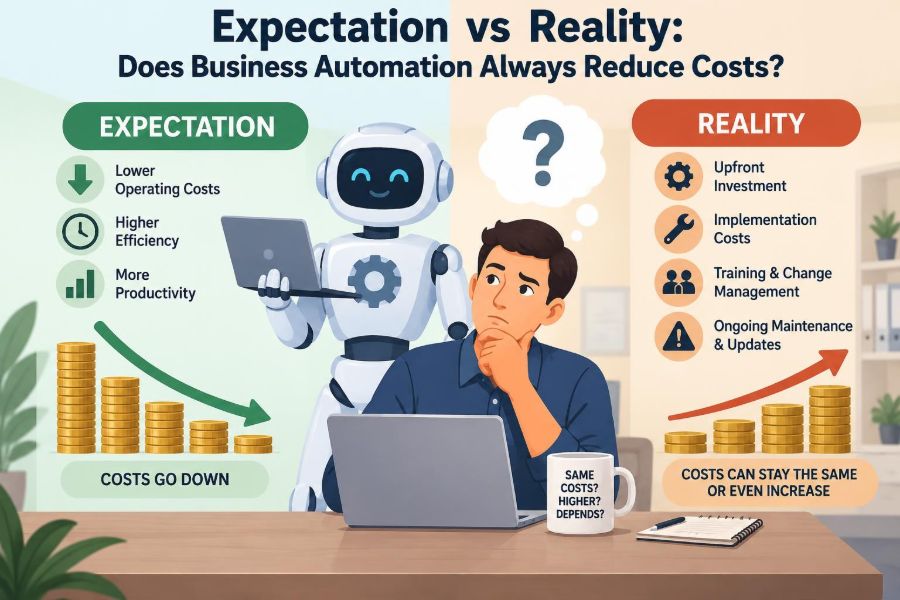

A customer service manager sees a demonstration of an automated chatbot. It can answer routine questions at any hour, route complex cases, and produce tidy reports. The business case seems obvious: fewer manual tasks should mean lower costs.
Six months later, the picture is less tidy. The team still handles exceptions, the software subscription has increased with usage, and someone now spends part of every week checking conversations, correcting data, and improving workflows.
This does not mean automation failed. It may have improved response speed, reduced errors, or helped the business serve more customers without immediately adding staff. But those gains are different from a simple reduction in spending.
For students and working professionals, the useful question is not whether automation is good or bad. It is whether a particular automated process creates enough value, over a realistic period, to justify every cost it introduces.
🤖 What business automation actually means
Business automation uses software, rules, machines, or connected systems to perform work that people previously performed manually. It can range from a spreadsheet that generates invoices to a warehouse system that directs picking equipment.
Automation is not the same as artificial intelligence. A rule that sends an approval request when an expense exceeds a set amount is automation. An AI tool that drafts a response to a customer may also be part of an automated workflow, but it brings additional uncertainty and oversight needs.
🎯 Why lower cost is the default expectation
Manual work has visible costs: wages, overtime, repetitive data entry, delays, and avoidable mistakes. When software completes a routine step quickly, managers naturally expect the cost of that step to fall.
That expectation can be reasonable when a process is stable, repeated often, and expensive to perform manually. The mistake is treating the saving on one task as proof that the total cost of the process will decline.
🧾 The right comparison is total cost, not headcount
A business should compare the full manual process with the full automated process. Headcount is only one component. The automated version may require subscriptions, integration work, data storage, support, security controls, training, and vendor management.
It also changes the nature of labour. Rather than eliminating all work, automation may move work from processing transactions to resolving exceptions, monitoring systems, analysing results, and serving customers with unusual needs.
🔍 Direct costs that appear before launch
Implementation usually begins with costs that are easy to underestimate because they occur before the new process is visibly producing results. A platform licence may be clear in a proposal, while internal preparation is less visible.
- Process mapping and requirements gathering
- Configuration, custom development, and testing
- Data cleansing and migration
- Integration with existing finance, sales, or operations systems
- Training, communications, and temporary parallel running
These are not signs of poor management. They are often necessary investments. The problem comes when a savings estimate excludes them.
🔄 Recurring costs do not stop after implementation
Many tools are purchased as subscriptions, so costs continue and may grow with more users, transactions, or advanced features. An automated workflow also needs maintenance when policies, products, suppliers, or regulations change.
A monthly review of a workflow may seem small. Across several systems, however, these responsibilities can become a meaningful operating cost. Automation is a capability that must be managed, not a machine that can be forgotten.
🧩 Integration is often the hidden budget item
A workflow rarely operates alone. An order automation tool might need customer data from a CRM, stock data from an inventory system, pricing from an accounting platform, and delivery updates from a logistics provider.
When systems use different formats, identifiers, or update schedules, staff may create workarounds. The business then pays for automation while retaining manual reconciliation. Integration cost is especially likely to rise when legacy systems were not designed to exchange data.
🧹 Poor data can automate the wrong answer
Automation follows the information it receives. Duplicate customer records, outdated product codes, or incomplete addresses can turn a fast workflow into a fast way of spreading errors.
Consider a hypothetical retailer that automatically reorders stock using inaccurate inventory counts. The ordering task becomes cheaper, but excess stock, missed sales, and customer complaints can make the overall outcome worse. Data quality is therefore part of the economic case, not an optional technical detail.
⚠️ Exceptions determine the real workload
Most automated processes work best on standard cases. The real test is what happens when an order is unusual, a document is missing, a customer disputes a charge, or an approval rule conflicts with business judgment.
If exceptions are rare and easy to handle, automation can be highly efficient. If they are frequent, staff may spend more time investigating issues than they previously spent completing the original task. Measure the volume and difficulty of exceptions before assuming a process is suitable.
🧑💼 Automation often changes jobs rather than removes them
Automating invoice entry, for example, may reduce clerical keystrokes. It can allow finance employees to investigate discrepancies, improve supplier relationships, and analyse cash-flow patterns instead.
This can be valuable even if payroll does not fall. A business may keep the same team and use its capacity for higher-value work. Calling that result “no savings” misses the benefit; calling it “headcount reduction” also misrepresents what happened.
📈 Capacity gains are valuable but different from cash savings
Automation can enable a team to handle higher volume without hiring at the same rate. This is a capacity gain: the business gets more output from existing resources.
It becomes a cash saving only when a cost that would otherwise occur is genuinely avoided. If demand never grows, extra capacity may have little financial value. If demand grows rapidly, avoiding future recruitment may be a major benefit, even though no current employee leaves.
⏱️ Speed creates value in more than one way
Faster processing can shorten order cycles, reduce waiting time, and help managers act on current information. Those effects can improve service and lower the chance that delays create rework or lost opportunities.
Still, speed is not automatically profitable. A faster approval workflow adds limited value if approvals were never a bottleneck. The useful question is: what costly delay does this automation remove, and who benefits from its removal?
✅ Accuracy savings depend on the baseline error
Automation is often more consistent than repetitive manual work, particularly when it validates required fields or applies standard calculations. Fewer errors can mean fewer refunds, corrections, and customer contacts.
But an automated rule can reproduce a flawed decision thousands of times. Before estimating error savings, understand the existing error rate, the cost of each error, and the controls that will detect a faulty rule quickly.
🛡️ Control and compliance can justify automation
Some automation is adopted mainly to improve traceability. A system can record who approved a payment, when a record changed, and which rule produced an outcome. That may make audits and internal reviews more manageable.
These benefits should be described carefully. Automation does not guarantee compliance; poorly configured access rights or rules can create new control failures. It can, however, make required controls more consistent when they are properly designed and monitored.
🔐 Security brings both protection and exposure
Automated systems can reduce risky practices such as emailing spreadsheets or sharing passwords to complete a routine task. They can also enforce permissions and preserve activity logs.
At the same time, connecting systems expands the number of access points and dependencies. A compromised account or incorrectly configured integration may affect many records quickly. Security testing, access reviews, backups, and incident procedures belong in the cost calculation.
📉 The break-even question needs a time horizon
Initial investment is usually paid early, while benefits arrive gradually. A simple break-even view asks when accumulated benefits exceed implementation and ongoing costs.
For a basic estimate, managers can calculate expected annual value from labour time avoided, error reduction, and credible capacity benefits, then subtract annual operating costs. They should also show a cautious scenario where adoption is slower or exception rates are higher. Forecasts are assumptions, not promises.
🧮 A practical total-cost comparison
| Cost or benefit area | Manual process | Automated process |
|---|---|---|
| Routine processing time | Employee time per transaction | Lower handling time, plus monitoring |
| Errors and rework | Manual correction and follow-up | Rule failures, data issues, exception handling |
| Technology | Existing tools and local workarounds | Licences, integrations, support, upgrades |
| Scalability | More volume may require more staff | May absorb volume within system limits |
| Control | Depends heavily on individual practice | Logs and standard rules, requiring governance |
The table is a prompt for investigation rather than a universal formula. Each cell should be supported by process evidence from the business concerned.
🧪 Pilot programs reveal assumptions early
A limited pilot can test whether a workflow works with real data and real users. It may uncover missing approval paths, confusing handoffs, or customers who need a different option before the organization commits to a wider rollout.
Define the pilot in advance: which process is included, what baseline will be used, who owns decisions, and what evidence would justify expansion. A pilot should test the business case, not merely demonstrate that software can run.
📏 Choose metrics that show the whole outcome
Tracking only “hours saved” can encourage a misleading success story. A balanced scorecard can combine cost, quality, speed, employee workload, customer experience, and risk indicators.
- Cost per completed transaction
- Cycle time from request to completion
- Exception rate and time to resolve exceptions
- Error, return, or rework rate
- Customer escalation volume where relevant
- System availability and manual fallback use
Metrics should be compared with a meaningful baseline. A number without a before-and-after context tells little about improvement.
🧭 Process redesign must come before digitising disorder
Automating a confusing process can lock in unnecessary approvals, duplicated checks, and unclear ownership. The software may make the process faster while preserving the causes of frustration.
Map the current flow first. Ask why each handoff exists, what decision is being made, and whether a control is still needed. Simplifying the work before automation often reduces configuration complexity and makes later benefits more achievable.
🏗️ Standard processes are better early candidates
Good early candidates are high-volume, rules-based tasks with relatively predictable inputs and clear outcomes. Examples may include sending payment reminders, assigning straightforward service requests, or reconciling standard records.
Processes requiring empathy, negotiation, nuanced judgment, or frequent policy interpretation may still benefit from tools, but full automation is less likely to be appropriate. A hybrid design can support employees without pretending every decision can be reduced to a rule.
🧑🤝🧑 Employee adoption affects the return
Employees are more likely to use a system well when they understand what problem it solves and how their role changes. If a tool is introduced only as a cost-cutting measure, people may reasonably fear job loss and withhold practical knowledge about exceptions.
Involve the people who do the work in testing and design. Their experience can identify edge cases and impractical rules long before customers encounter them. Training should explain both the new steps and the purpose behind them.
🗣️ Customer experience can outweigh internal efficiency
A company might reduce contact-centre workload by directing customers to self-service options. If those options solve common problems clearly, both sides benefit. If they trap customers in confusing menus, complaints and churn risk may rise.
Automation should leave a visible route to human help when the situation is sensitive, complex, or unresolved. The least expensive interaction is not always the one that creates the most durable customer relationship.
🔗 Vendor dependence is a strategic cost
A platform may be economical at first but difficult to replace later because workflows, staff habits, and data structures become tied to it. Price changes, reduced support, or changes in product direction can then affect the business more than expected.
Before choosing a provider, examine data export options, contract terms, support responsibilities, integration methods, and the effort required to switch. This is not a reason to avoid vendors; it is a reason to recognize dependency as a decision factor.
🧯 Build a manual fallback for critical work
When automated payroll, ordering, scheduling, or customer communications fail, work may stop unless people know what to do next. A fallback procedure can be slower, but it protects continuity.
Document who can pause the automation, how records will be checked, and how duplicate actions will be prevented when the system returns. Testing the fallback occasionally is more useful than discovering its gaps during an outage.
🚫 Common ways automation cases go wrong
Weak business cases often share predictable patterns. They count gross labour savings, assume perfect adoption, and ignore the work needed to maintain the solution.
- Buying a tool before defining the process problem
- Using vendor demonstrations as proof of local results
- Assuming every saved minute becomes a cash saving
- Ignoring data cleanup and exception handling
- Measuring launch activity rather than operational outcomes
- Failing to assign an owner after implementation
These errors are avoidable when leaders treat automation as operational change, not just a technology purchase.
🧱 A staged approach reduces avoidable risk
Start with a narrow process where the baseline is understood and failure has manageable consequences. Design controls, train users, run a pilot, and review evidence before extending the model.
A sensible sequence is to simplify the process, verify the data, automate a defined segment, monitor results, and then improve or expand. This approach may feel slower than a large rollout, but it prevents expensive problems from being replicated at scale.
💡 When automation may raise costs for good reasons
Some investments increase spending while delivering a stronger capability. A better fraud review system, more robust backup process, or improved accessibility workflow may require software and specialist oversight without producing immediate payroll savings.
That can still be a sound decision if leaders state the objective honestly: lower risk, better service, improved resilience, or capacity for future growth. Not every worthwhile automation project should be forced into a narrow cost-cutting narrative.
📌 The core principle: automate for value, not appearances
Business automation does not always reduce costs, and it does not need to do so to be worthwhile. Its value depends on the process, the quality of data, the cost of change, the scale of use, and the outcomes the organization genuinely needs.
The strongest decisions distinguish between cash savings, capacity gains, quality improvements, risk reduction, and strategic flexibility. They count recurring work as well as removed work, and they keep humans responsible for judgment, oversight, and improvement.
Automation succeeds financially when it improves the whole process more than it costs to build, run, govern, and adapt—not simply when it replaces a visible manual task. 📊⚙️