
A department manager opens an AI-generated summary of last quarter’s customer complaints. It is neat, confident, and full of recommended actions. The manager could forward it to the leadership team in minutes—but one recommendation would reduce service hours for a group of customers whose needs are not visible in the summary.
Situations like this are becoming ordinary. AI can draft reports, prioritize support tickets, forecast demand, screen documents, and turn meetings into action lists. Used well, it removes routine effort and gives managers more time for judgement, coaching, and problem-solving.
Used carelessly, it can make a weak assumption look polished, turn an old bias into a faster process, or create decisions that nobody can properly explain. The central management challenge is not choosing between people and AI. It is deciding where human judgement must remain active.
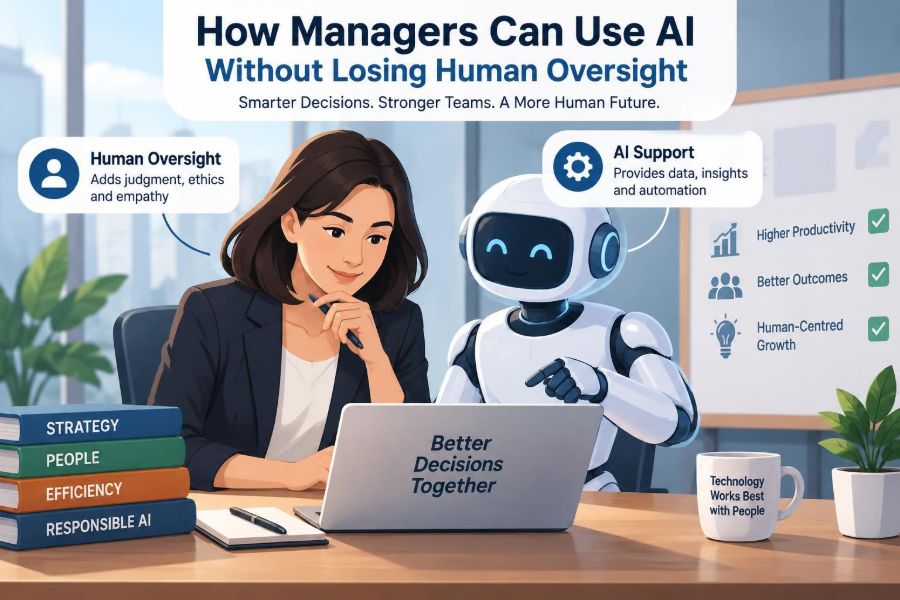
Human oversight is not a ceremonial approval at the end of an automated workflow. It is a deliberate management system: setting the goal, checking the inputs, questioning the output, owning the decision, and learning from what follows.
🧭 Start with the real management question
AI works best when it is applied to a clearly defined management problem, not to a vague desire to “use AI.” A manager might need to reduce the time spent compiling weekly updates, identify recurring themes in customer feedback, or prepare several plausible staffing scenarios.
State the decision or task in plain language before selecting a tool. If the question is unclear, the system may produce a large amount of content without moving the team closer to a useful action.
A helpful test is: What will a person do differently after receiving this output? If there is no answer, the task may be too broad or not worth automating.
🤖 Understand AI as an assistant, not an authority
Many workplace AI tools generate predictions, classifications, recommendations, or language by identifying patterns in data. They do not possess responsibility, organisational context, or a personal understanding of consequences.
A generative AI tool can create a convincing project update even when a key detail is wrong. A predictive tool can rank applicants or flag likely late payments without knowing whether the underlying records reflect fair opportunities or unusual circumstances.
Managers should treat AI output as decision support: material to inspect and use, not an instruction to obey. The manager remains accountable for the result.
🧠 Define what human oversight actually means
Human oversight has three practical layers. First, people decide whether AI should be used for a particular purpose. Second, they supervise its operation and review its output. Third, they can intervene, reverse a decision, or stop the process when something is wrong.
This is more demanding than placing a person at the final click. A reviewer who has no time, authority, information, or training to challenge a recommendation is not providing meaningful oversight.
- Before use: define purpose, boundaries, and acceptable data.
- During use: monitor quality, exceptions, and unusual patterns.
- After use: review outcomes and improve or withdraw the workflow.
🎯 Match oversight to the stakes
Not every AI-assisted task deserves the same level of control. Asking a tool to suggest a first draft of a meeting agenda is very different from using it to influence promotion, hiring, discipline, pricing, credit, safety, or access to essential services.
The more a decision affects a person’s rights, livelihood, safety, or opportunity, the less acceptable it is to rely on an unexamined automated recommendation. High-impact decisions need informed human review, a route for correction, and clear ownership.
Consider both the harm if the output is wrong and the difficulty of noticing the error. A small mistake repeated across thousands of transactions can become a major operational problem.
🗺️ Map the workflow before adding AI
Managers often begin with the tool rather than the process. Instead, map the current workflow: where information enters, who makes decisions, what rules apply, what exceptions occur, and how results are checked.
This reveals whether AI is solving a real bottleneck or merely accelerating a confused process. It also identifies points where human review has the most value.
For example, an AI system may sort incoming procurement requests by category. A purchasing specialist can then focus on unusual requests, policy exceptions, and high-value commitments rather than manually sorting every routine form.
🔍 Separate tasks from decisions
A useful distinction is between a task and a decision. Tasks include transcribing a meeting, extracting fields from invoices, summarising documents, or grouping similar feedback. Decisions involve choosing a supplier, assigning work, approving leave, or changing a customer policy.
AI can often assist substantially with tasks. Decisions usually require broader context: competing priorities, relationships, ethics, legal duties, and knowledge that may not exist in the data.
Even when a system supplies a recommendation, managers should name the human decision-maker. This avoids the dangerous phrase, “the system decided.”
📊 Check whether the data fits the purpose
AI output is shaped by the data it receives. Incomplete, outdated, unrepresentative, or inconsistently recorded data can produce misleading recommendations even when the software functions as designed.
Ask practical questions: Does this data describe the current situation? Who is missing from it? Were fields entered consistently? Does it include proxy measures—an indirect signal standing in for something else—that could distort the result?
For instance, past sales may help forecast demand, but they may not capture a new competitor, a supply interruption, or a change in customer behaviour. A forecast is an input to planning, not a substitute for market awareness.
⚖️ Watch for bias and unequal effects
Bias can enter through historical data, labels chosen by people, design choices, or the way a tool is deployed. If past practices treated groups differently, a model trained on those patterns may reproduce or intensify the pattern.
Managers do not need to be technical specialists to ask sound questions. Compare outcomes across relevant groups where appropriate, investigate unexpected differences, and avoid using sensitive personal information casually or unnecessarily.
Fairness is not solved by removing one field from a spreadsheet. Other variables may act as proxies. Where consequences are serious, involve people with legal, HR, risk, compliance, or domain expertise.
🔐 Protect confidential and personal information
Convenience can tempt employees to paste customer records, employee performance notes, contract terms, or internal strategy into a public AI service. That may expose information beyond the organisation’s intended controls.
Managers should establish which tools are approved, what kinds of data may be entered, how records are retained, and who can access them. A tool’s terms, security settings, and data-handling arrangements should be reviewed through the organisation’s appropriate governance process.
When possible, remove identifiers, use synthetic examples for drafting, and provide only the minimum information needed. Data minimisation reduces risk without preventing useful experimentation.
🧾 Make the output traceable
When AI informs an important decision, the team should be able to reconstruct what happened. Keep a proportionate record of the prompt or input, the tool and version used where available, the output, the human review, and the final decision.
Traceability helps managers answer basic questions later: What information was considered? Was the recommendation altered? Who approved it? Did the outcome match expectations?
This is not paperwork for its own sake. It supports learning, accountability, customer explanations, and internal reviews when a decision is challenged.
🧪 Pilot narrowly before scaling
Begin with a bounded use case that has a clear owner and a measurable operational purpose. A pilot can show how the tool behaves with real work while limiting the consequences of errors.
Set a comparison point before launch. For a document-summary tool, compare its summaries with human summaries for completeness, accuracy, and time saved. For a ticket-routing tool, check whether important cases are sent to the right team.
A pilot should also test failure conditions, not just normal cases. Deliberately include ambiguous requests, unusual formats, and edge cases that could reveal weak assumptions.
🧱 Build guardrails into the process
Guardrails are operational limits that prevent a useful tool from being used in unsafe ways. They work best when designed into the workflow rather than written as a policy nobody sees.
- Require human approval before external messages, payments, hiring actions, or formal commitments.
- Set confidence or risk thresholds that trigger manual review.
- Block prohibited data from being uploaded.
- Route sensitive cases to qualified staff rather than automated handling.
- Provide a clear stop button and escalation route.
Good guardrails preserve speed in low-risk work while directing attention where judgement matters most.
🚦Use thresholds carefully
Thresholds can make review manageable. For example, a system might automatically classify straightforward service requests but require a person to inspect cases with conflicting information or a low-confidence classification.
However, a numerical threshold is not a moral or managerial guarantee. A system can be highly confident and still wrong because the case is outside its experience or the input is flawed.
Use thresholds as a queue-management tool, then supplement them with random sampling and rules for sensitive categories. This prevents teams from reviewing only the cases the system admits it finds difficult.
👥 Give reviewers real authority and time
Human review fails when it becomes rubber-stamping: people approve recommendations because targets, workload, or organisational culture make challenge unrealistic. A review stage must be designed for genuine judgement.
Reviewers need enough context to understand the case, permission to disagree, and a practical route to send issues back for correction. Their performance measures should not reward speed alone.
A manager can reinforce this by asking, “What would make us reject this recommendation?” That question turns review from confirmation into evaluation.
🧑🏫 Train people to question outputs
AI literacy is not only technical training. Staff need to understand common failure modes: fabricated details, stale knowledge, overly broad summaries, biased patterns, and confident wording that hides uncertainty.
Training should use examples from the team’s actual work. Let employees compare a plausible but flawed output with a stronger human-reviewed version, then discuss what signals should have prompted a check.
Teach people to verify important claims against reliable source material. “The AI said so” is never an adequate basis for an important decision.
🗣️ Explain AI’s role to affected people
Transparency should be practical rather than theatrical. Employees, customers, or candidates may need to know when AI is used to assist a process, especially if it shapes a consequential outcome.
Clear communication can explain the purpose of the tool, the role of human reviewers, what information is considered, and how someone can question or correct a result. The exact requirements will vary by context and jurisdiction, so organisations should seek appropriate advice where needed.
People are more likely to trust a process when they can understand its boundaries and see that a responsible person remains available.
💬 Keep communication human
AI can draft routine messages quickly, but managers should be cautious when communication involves conflict, performance concerns, grief, complaints, or a major change. Tone is not merely a writing feature; it signals care, accountability, and understanding.
Use AI to organise facts or suggest a starting structure if appropriate. Then apply human judgement to wording, timing, privacy, and the opportunity for dialogue.
A manager should never use a generated message to avoid a difficult conversation that they are responsible for having.
📈 Measure outcomes, not just time saved
Time saved is valuable, but it is not enough to show that an AI workflow is working. A faster process that increases rework, complaints, poor decisions, or employee frustration may create hidden costs.
Choose measures linked to the purpose of the workflow. These might include accuracy checks, correction rates, response quality, escalation volume, processing time, customer feedback, or consistency of decisions.
Combine numbers with qualitative feedback. The people handling exceptions often notice problems before a dashboard does.
🔄 Monitor for drift and changing conditions
Models and workflows can become less reliable when conditions change. This is often called drift: the relationship between past patterns and present reality no longer holds.
A demand forecast built on ordinary seasonal behaviour may struggle after a product change or supply disruption. A ticket classifier may weaken when customers begin using new language for a new problem.
Schedule periodic checks, especially after policy changes, system updates, new data sources, or notable shifts in outcomes. Monitoring is an ongoing management duty, not a launch-day exercise.
🧯 Plan for errors before they occur
Every AI-assisted process needs a response plan. Decide who investigates a questionable output, how affected people can report an issue, when the workflow should be paused, and how corrections will be communicated.
For high-stakes workflows, define escalation levels in advance. A single inaccurate draft may require coaching; a pattern of incorrect recommendations affecting many people may require immediate suspension and a retrospective review.
A prepared response protects both the organisation and the people affected. It also reduces the temptation to conceal errors because nobody knows what to do next.
📋 Assign clear accountability
AI can blur ownership because several groups may be involved: a business team chooses the use case, IT integrates the tool, procurement obtains it, and frontline staff use it. Unless roles are explicit, important gaps appear.
Name a business owner who is accountable for the outcome, not just the software. Also identify who approves changes, who monitors performance, who handles incidents, and who reviews data practices.
A simple responsibility map is often more useful than a large policy document. People should know where to take a concern and who has authority to act.
🤝 Involve frontline employees early
Frontline employees understand the exceptions, workarounds, and customer concerns that process diagrams often miss. Involving them early improves the design and reduces the risk of introducing a tool that looks efficient on paper but creates extra work in practice.
Ask them which tasks are repetitive, which decisions are nuanced, and what information they need to resolve cases well. Their answers can reveal suitable automation opportunities and non-negotiable human touchpoints.
Participation also matters for adoption. People are more likely to use a system responsibly when they understand its purpose and have helped shape its safeguards.
🧩 Keep skills alive instead of automating them away
If a team delegates too much judgement to AI, people may lose the ability to spot errors, explain decisions, or operate effectively when the tool is unavailable. This is sometimes called automation complacency: overreliance caused by habitual trust in automated support.
Maintain human practice through case reviews, rotation of responsibilities, and occasional manual checks. Junior staff, in particular, need opportunities to develop the judgement that automation might otherwise bypass.
The goal is not to preserve manual work unnecessarily. It is to preserve the expertise needed to supervise, challenge, and improve automated work.
⚠️ Avoid common management mistakes
Several errors recur when teams adopt AI quickly. The first is treating polished language as evidence of accuracy. The second is assuming a vendor tool fits local policies, data, and customers without testing it.
Other frequent mistakes include automating a broken process, giving reviewers no authority, hiding AI use from affected people, and measuring only productivity. Each mistake weakens oversight from a different direction.
Managers should also avoid one-size-fits-all rules. Banning every use can push experimentation into unapproved channels, while allowing every use invites uncontrolled risk. Clear boundaries are more workable than either extreme.
🛠️ Create a practical AI use policy
A useful team policy should be short enough to guide everyday decisions and specific enough to prevent predictable mistakes. It does not need to answer every future question; it needs a route for raising new ones.
What a working policy should cover
- Approved tools and prohibited uses.
- Data that may and may not be entered.
- Tasks requiring human review or approval.
- Rules for verification, record-keeping, and external communication.
- Escalation contacts for privacy, bias, security, or quality concerns.
- Review dates as tools and business conditions change.
Make the policy part of onboarding, team meetings, and workflow design—not a document that appears only after an incident.
🧮 Use a simple decision matrix
Before approving an AI use case, managers can assess it against a few dimensions. The goal is not to create false precision, but to make trade-offs visible and determine the right level of control.
| Question | Lower-risk indication | Higher-risk indication |
|---|---|---|
| What is the outcome? | Internal draft or routine sorting | Decision affecting rights, pay, safety, or access |
| What data is used? | Non-sensitive, well-understood information | Personal, confidential, incomplete, or sensitive data |
| How reversible is it? | Easy to correct before impact | Hard to undo after action is taken |
| How visible are errors? | Errors are quickly noticed | Errors may remain hidden or scale widely |
| What control is needed? | Sampling and basic review | Expert review, documentation, and escalation plan |
Use the answers to set controls, rather than assuming that every AI application should be treated identically.
🌱 Begin with augmentation, not replacement
For many teams, the safest first applications are those that augment people: drafting options, finding patterns, retrieving relevant material, summarising routine information, or preparing a first-pass analysis.
Augmentation leaves room for people to apply context and makes it easier to compare the tool’s contribution with existing practice. It can also produce immediate value without redesigning an entire operation around an untested system.
As capability and evidence grow, a team may automate narrow, reversible tasks. The burden of oversight should rise as the system’s autonomy and possible impact increase.
🔍 Ask better questions of vendors and internal teams
Managers do not need to inspect every technical detail, but they should ask enough questions to understand a tool’s limits. What data does it use? Can its output be reviewed? How are changes communicated? What controls exist for access, retention, and error handling?
Ask whether the tool can be configured to match internal policies and whether the provider can support audits or incident investigation appropriate to the use case. A feature demonstration is not the same as evidence that a workflow is suitable.
Internal technical teams should likewise explain limitations in business language. Good governance depends on translation between operational, technical, legal, and human concerns.
🪞Make review a learning loop
The strongest oversight systems use errors and challenges to improve future practice. When a reviewer corrects an output, capture the reason: missing context, ambiguous input, outdated information, poor instruction, or a task the tool should not handle.
Patterns in corrections can lead to better prompts, revised workflows, additional training, stronger data controls, or a decision to retire the use case. This turns oversight from a brake on innovation into a source of operational learning.
Regular review meetings can be brief and focused: what worked, what failed, what changed, and what action is needed before the next cycle.
🏁 The core principle: retain responsible judgement
AI can make managers faster, more informed, and better able to focus on work that needs empathy and strategic thought. It can also magnify poor data, unclear policies, and unexamined assumptions at speed.
The difference lies in management design. Set a clear purpose, use suitable data, match controls to risk, empower reviewers, document important decisions, and keep watching outcomes after deployment.
Most of all, do not confuse automation with accountability. Software can generate an output; people must remain responsible for the choices made with it.
Managers use AI well when it strengthens human judgement rather than quietly replacing it. That balance creates room for efficiency without abandoning care, fairness, or responsibility. 🤖🧭📋