
A customer calls to ask why an order is late. The sales representative can see the conversation history, but not the warehouse status. Finance has already issued an invoice. Operations is working from a spreadsheet that was updated yesterday. Each person has part of the answer, yet no one has the whole picture.
This situation is common because businesses rarely run on one application. They use a collection of systems for customers, money, inventory, projects, people, reporting, and routine tasks. The value does not come only from buying those tools; it comes from making the right information move between them at the right time.
For students, this explains why job roles increasingly involve dashboards, workflows, and shared records. For working professionals, it explains why a seemingly small process change can affect several departments at once.
CRM, ERP, analytics, and automation software form much of the operating backbone of a modern business. Understanding their roles—and their limits—helps managers design better processes rather than simply adding more technology.
🧩 A Business System Is More Than a Single App
A business system is a set of people, processes, data, rules, and software working together to accomplish a recurring task. Software supports the system, but it does not replace decisions, accountability, or clear procedures.
Consider order fulfilment. A customer-facing system records the sale, an inventory system confirms stock, a finance system creates the transaction, and a shipping tool produces a label. The process succeeds only when these pieces agree on what was sold, to whom, for what price, and when it must arrive.
The central management question is not “Which tool is best?” but “Which system should own each piece of information, and how should the rest use it?”
🏗️ The Core Software Categories
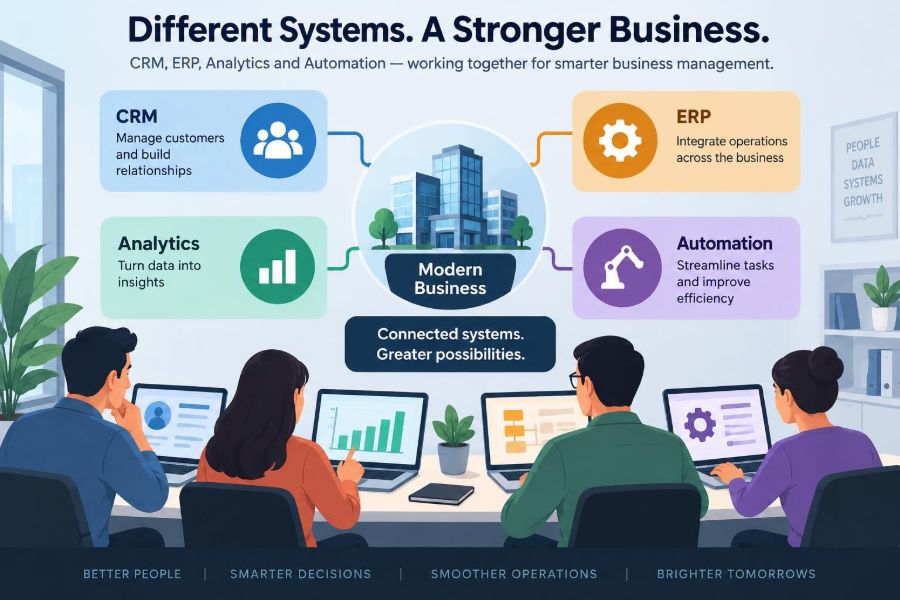
The labels can sound technical, but their purposes are practical. CRM focuses on customer relationships. ERP coordinates core internal resources and transactions. Analytics turns data into insight. Automation carries out defined actions with less manual effort.
| System category | Primary focus | Typical users | Example records |
|---|---|---|---|
| CRM | Prospects, customers, and interactions | Sales, marketing, service | Leads, contacts, deals, cases |
| ERP | Operational and financial resources | Finance, operations, procurement | Orders, invoices, inventory, payroll data |
| Analytics | Measurement and decision support | Managers, analysts, teams | Metrics, trends, forecasts |
| Automation | Repeatable actions and handoffs | Many functions | Rules, workflows, task logs |
In smaller organizations, one product may cover several categories. In larger ones, specialized tools often connect through integrations.
🤝 What CRM Actually Manages
Customer relationship management, or CRM, stores and organizes information about people and organizations a business wants to serve. It commonly tracks leads, contacts, sales opportunities, communications, support requests, and account history.
Its goal is continuity. When a salesperson leaves, a service agent should not have to reconstruct every promise, call, email, and purchase from memory. A well-maintained CRM makes the relationship visible to the organization rather than private to one employee.
CRM is not only for sales. Marketing may use it to segment audiences, customer success teams may use it to monitor renewals, and managers may use it to understand the pipeline of possible future revenue.
🎯 The CRM Journey From Lead to Customer
A lead is a potential customer who has shown some level of interest. A CRM can record where that interest came from, such as a referral, event, website form, or inquiry. As information develops, the lead may become a qualified opportunity and eventually a customer account.
Each stage should reflect a real business condition, not wishful thinking. For example, “proposal sent” is meaningfully different from “verbal interest,” because the next action, probability of purchase, and management forecast may differ.
- Lead: an unqualified prospective buyer.
- Contact: an identified person associated with a prospect or customer.
- Opportunity: a potential sale being actively evaluated.
- Account: the organization or customer relationship.
- Case or ticket: a service issue, request, or question.
Useful stages create a shared language. Overly detailed stages often become a reporting burden that employees work around.
🏭 ERP as the Operational Backbone
Enterprise resource planning, or ERP, integrates processes involving money, materials, purchasing, production, inventory, and other internal resources. Its design is often transaction-focused: a purchase order, goods receipt, sales order, invoice, payment, or inventory adjustment should leave a reliable record.
The term “enterprise” can make ERP sound limited to very large companies. In practice, businesses of many sizes use ERP-style systems, though the modules and level of complexity vary substantially.
ERP is especially valuable when a change in one area must update another. Selling an item can reduce available inventory, create a receivable, trigger fulfilment, and influence demand planning. Without connected records, staff may repeatedly enter the same facts into different places.
💰 Why Financial Records Need Control
Financial data has consequences beyond operational convenience. Invoices, payments, expenses, tax-related information, and account balances require careful permissions, audit trails, and reconciliation. For this reason, finance teams often treat the ERP or accounting platform as the authoritative source for completed financial transactions.
A CRM may show an expected deal value, but that does not make it recognized revenue. A dashboard may display an estimated margin, but it cannot replace a properly maintained cost record. Confusing forecasts with finalized transactions can lead managers to act on the wrong picture.
Good integration preserves the distinction: sales can see relevant invoice status, while finance retains control over accounting rules and approvals.
📦 Inventory, Purchasing, and Fulfilment
For companies that make, distribute, or sell physical goods, inventory is where disconnected systems become particularly costly. A product can appear available in a sales tool while it is reserved for another order, awaiting inspection, or delayed by a supplier.
ERP modules help coordinate stock levels, locations, purchase orders, supplier information, and fulfilment activities. Some businesses also use dedicated warehouse or manufacturing systems when their processes require more detailed control.
A practical example: when a sales order is confirmed, the ERP may reserve inventory. When warehouse staff pick and ship it, the status updates. When the shipment is complete, finance can issue or finalize the invoice according to company policy. The customer-facing team then sees a credible status rather than guessing.
📈 Analytics Turns Records Into Questions
Analytics software gathers, organizes, and presents data so people can understand performance and make decisions. It may use dashboards, reports, charts, data models, or statistical methods. The output is not automatically insight; someone still needs to ask a sensible question and interpret the result.
A sales manager might ask which sources produce qualified leads rather than simply the largest number of inquiries. An operations manager may ask why delivery times vary by product or location. A finance leader may compare actual spending against a budget.
Analytics is most useful when it connects a decision to a measurable outcome. A colorful dashboard that nobody uses to change priorities is decoration, not management infrastructure.
🗂️ Operational Reports and Analytical Reports
Not all reporting serves the same purpose. Operational reports support immediate work: today’s unshipped orders, overdue invoices, open service tickets, or low-stock items. They need timely, detailed records.
Analytical reports support patterns and decisions over time: conversion by channel, repeat purchase behavior, demand trends, or profitability by product category. They may combine data from several systems and use historical snapshots.
Mixing these needs can create confusion. A real-time operational screen may change throughout the day, while a monthly management report may need a controlled reporting period so figures remain comparable.
🔄 Automation Is a Workflow, Not Magic
Automation uses rules or software to complete repeatable actions with limited human intervention. A simple workflow might assign a task when a new lead arrives. A more complex one might validate data, request approval, create a record in another system, and alert a team when an exception occurs.
Automation reduces routine handoffs, but it should not be used to hide an unclear process. If staff disagree about who approves discounts or which customer details are required, automating the confusion merely makes it happen faster.
The best candidates are high-volume, rule-based tasks with predictable inputs and outcomes. Exceptions should be visible and routed to people who have authority to resolve them.
⚙️ Common Automation Patterns
Most business automations follow a trigger-condition-action structure. A trigger starts the process, conditions determine whether it should continue, and actions update records, send notifications, create tasks, or call another service.
- Lead routing: assign a new inquiry based on territory, product interest, or customer type.
- Approval workflow: request review when a purchase or discount exceeds a defined threshold.
- Order notification: alert operations when a confirmed sale requires special handling.
- Service escalation: notify a supervisor when a case has no response within a target time.
- Data quality check: flag a record missing a required identifier before it reaches finance.
These patterns are useful because they turn unwritten habits into visible, testable process rules.
🧠 The Data Layer Beneath Every Tool
Software connections depend on data: names, identifiers, timestamps, amounts, product codes, statuses, and relationships between records. If these fields are inconsistent, the systems may technically connect while the business still receives unreliable answers.
For instance, “Acme Ltd.,” “ACME Limited,” and “Acme” may refer to the same customer. Unless the organization has matching rules or a shared identifier, reports can split one relationship into three. Duplicate records also cause sales teams to contact the same person repeatedly or service teams to miss relevant history.
Data management is therefore a business responsibility, not only an IT task. The people who use the information must help define what a valid record looks like.
🏷️ Master Data Creates a Shared Vocabulary
Master data is the relatively stable information used across processes: customer accounts, products, suppliers, locations, employees, and chart-of-accounts categories. It differs from transaction data, which records events such as orders, payments, shipments, and returns.
When customer names, product codes, or units of measure differ between systems, integration becomes fragile. A product sold in “boxes” in one tool and counted as individual units in another can create misleading inventory or revenue analysis.
Clear ownership helps. A company may decide that finance owns legal customer billing details, operations owns product attributes, and sales maintains relationship contacts. Ownership should include a process for correcting errors, not simply a title on an organizational chart.
👑 Choosing a System of Record
A system of record is the authoritative place for a particular type of information. There does not have to be one system of record for everything. In fact, assigning one tool to own all data usually creates unnecessary compromises.
For example, a CRM may own sales-stage information and account interactions. An ERP may own invoice balances and inventory transactions. An HR platform may own employment details. Other tools can display or copy selected data, but they should not silently overwrite the authoritative source.
The key is to document the decision. If two systems can edit the same customer address without rules for resolving conflicts, eventually each will claim to be correct.
🔌 How Systems Exchange Information
Systems can connect in several ways. An application programming interface, commonly called an API, lets software request or send data through defined rules. APIs are common because they can support structured, repeatable exchanges.
Other approaches include scheduled file transfers, direct database connections, integration platforms, or manual imports and exports. The right choice depends on volume, timing, cost, security, technical capability, and the consequences of an error.
“Real time” is not always necessary. A daily update may be sufficient for a planning dashboard, while a payment hold or inventory reservation may require near-immediate synchronization. Requirements should follow the business risk, not a vague preference for speed.
🧭 Integration Maps the Business Process
An integration should be designed around a process map, not around a list of fashionable applications. Start with the event that begins the process, identify the decisions and handoffs, and specify what information each participant needs.
Imagine a business-to-business sale. A prospect becomes an opportunity in the CRM. Once approved, the customer account and order are created in the ERP. The ERP returns order status and billing information to the CRM. Analytics combines sales, shipment, and payment data to examine performance.
This map exposes practical questions: Who can edit the customer? What happens if credit approval fails? Which system sends the customer confirmation? How are cancellations handled? These questions matter more than the diagram’s visual polish.
➡️ One-Way and Two-Way Synchronization
One-way synchronization sends information from a source system to a destination. It is easier to govern because the direction is clear. For example, finalized invoice status may flow from ERP to CRM so account managers can answer customer questions.
Two-way synchronization allows both systems to update selected information. It can be useful when separate teams genuinely need to work in different tools, but it increases the chance of conflicts, duplicate updates, and unclear ownership.
Before enabling two-way sync, define field-level rules. If a contact phone number changes in both systems, which update wins? If a record is deleted in one system, should deletion spread? A simpler one-way design is often safer when the business can support it.
⏱️ Events, Batches, and Timing
Event-driven integration sends data after a meaningful occurrence, such as an order approval or a support case closure. Batch integration collects changes and moves them at intervals, such as every night. Both approaches are legitimate.
Event-driven flows can improve responsiveness, but they need monitoring because a failed message can interrupt a process immediately. Batch flows are often simpler for large volumes or low-urgency reporting, though they create a delay between reality and what another system shows.
Managers should ask a precise question: “How old can this information be before it causes a bad decision or customer experience?” The answer sets a useful timing requirement.
🛡️ Security and Access Cannot Be an Afterthought
Connected systems expand convenience and exposure at the same time. A user who can see customer contacts may not need to see payroll details. A marketing platform may need an email address but not a bank account number. Access should reflect job responsibilities.
Practical controls include role-based permissions, multi-factor authentication, review of administrator accounts, and logs that show important changes. Integrations also need secure credentials and careful limits on what they can read or modify.
Security is not only a technical issue. Employees need clear procedures for handling exported files, sharing dashboards, and responding to suspicious requests. A strong integration design follows the principle of giving the minimum access needed for the task.
🔒 Privacy, Retention, and Responsible Use
Customer and employee information may be subject to privacy obligations that vary by location, industry, and circumstance. Organizations should seek appropriate legal and compliance guidance for their own situation rather than assuming a software setting solves every requirement.
From a management perspective, collect information for a defined purpose, avoid retaining unnecessary data indefinitely, and know which systems contain sensitive fields. Connecting data broadly because it might be useful later can create avoidable risk.
Analytics deserves particular care. A dashboard that combines data can reveal patterns that individual systems do not. That may help service or planning, but it also requires thoughtful choices about access, context, and fair use.
📏 Metrics Need Definitions Before Dashboards
Metrics such as “customer,” “active opportunity,” “on-time delivery,” or “gross margin” can have multiple reasonable meanings. A dashboard cannot resolve an undefined term; it will simply calculate one interpretation consistently.
For example, on-time delivery could mean shipped by the promised date, delivered by the promised date, or delivered within a tolerance window. Each definition may be suitable for a different purpose. Problems arise when teams compare numbers built on different definitions.
Create a metric dictionary for major measures. It should state the formula, source systems, owner, refresh timing, exclusions, and intended use. This turns reporting from a debate over whose spreadsheet is right into a discussion of business performance.
📊 Leading and Lagging Indicators
Lagging indicators describe results that have already occurred, such as collected revenue, completed orders, or past customer churn. They are essential for accountability but may be too late to change the outcome.
Leading indicators signal conditions that could influence future results. Examples might include the age of open support cases, stock coverage for fast-moving items, the number of qualified opportunities, or the share of orders awaiting approval.
A balanced dashboard uses both. Leaders need to know what happened, but they also need early evidence that helps teams intervene before a problem becomes a monthly result.
🧪 A Hypothetical Connected Business Example
Consider a hypothetical company that sells commercial equipment. Its sales team logs a potential deal in CRM, including the customer’s requirements and expected delivery date. The opportunity is not yet an ERP order because the buyer has not approved the quote.
Once the buyer accepts, the approved order moves to ERP. The ERP checks credit terms, confirms available inventory, and creates fulfilment work. If stock is unavailable, operations receives an exception rather than allowing sales to promise an unsupported date.
Shipping updates the ERP when the equipment leaves the warehouse. Selected status information returns to the CRM, where the account manager can communicate confidently. An analytics dashboard later compares promised dates, shipment dates, discount levels, and service cases to identify where the process needs attention.
The point is not that every company needs this exact design. It is that each system contributes according to its strength, while shared data connects the customer experience.
🚧 Common Mistake: Buying Tools Before Designing Work
A frequent failure begins with a software demonstration that makes a feature look simple. The organization purchases the tool, then discovers that its own approvals, product definitions, and customer handoffs are inconsistent.
Technology can reveal process weaknesses, but it cannot choose the organization’s policies. Before configuration begins, teams should agree on the current process, the desired future process, exceptions, decision rights, and measures of success.
Start with a limited number of high-value workflows. Trying to redesign every department at once makes training, testing, and change management much harder.
🧹 Common Mistake: Treating Data Cleanup as a One-Time Project
Many implementations begin with a major effort to remove duplicates, standardize fields, and archive outdated records. That work is valuable, but data quality declines again if daily entry rules are unclear or nobody reviews exceptions.
Build ongoing controls into the process: required fields where justified, validation rules, duplicate checks, periodic review, and accountable data owners. Avoid forcing fields just because a system can require them; excessive mandatory entry encourages inaccurate placeholder values.
Clean data is a continuing operating discipline, much like inventory accuracy or financial reconciliation.
🧱 Common Mistake: Creating a Fragile Integration Web
As organizations add tools, they may create many direct connections: CRM to email platform, email platform to analytics, ERP to spreadsheet, spreadsheet to another reporting tool. Each connection may seem harmless, yet together they become difficult to understand and maintain.
This is sometimes called point-to-point integration. It can be appropriate for a small, stable need, but it becomes risky when many systems depend on undocumented field mappings and individual employees’ knowledge.
Maintain an integration inventory showing the source, destination, data fields, owner, frequency, failure response, and business purpose. Where complexity grows, an integration platform or shared data layer may reduce duplication—but only if it is governed well.
👥 Change Management Makes Adoption Real
A technically successful system can still fail in practice if employees do not understand why their routines changed. Staff may keep private spreadsheets, delay updates, or enter minimal information when the new process feels like extra administration.
Effective change management explains the purpose in terms of daily work: fewer repeated questions, clearer handoffs, faster approvals, or more reliable customer answers. Training should use realistic scenarios, not only a tour of buttons and menus.
Managers also need to reinforce the new behavior. If leaders continue requesting separate spreadsheets instead of using agreed reports, they signal that the shared system is optional.
🧑💼 Roles and Governance Keep Systems Useful
Governance means deciding who has authority to make and maintain decisions about systems, data, processes, and changes. It does not require a large committee for every organization, but it does require clarity.
Typical responsibilities include process owners who define how work should happen, data owners who define key records, system administrators who manage configuration and access, and business users who report problems and improvement ideas.
Change requests should be assessed for downstream effects. Adding a field to a CRM may affect a report, an automation rule, a mobile form, and an ERP integration. Small changes are often not isolated changes.
🧭 Selecting Technology From Business Needs
Software selection should begin with requirements grounded in work, not an exhaustive feature checklist. Ask which decisions are currently slow or poorly informed, where errors occur, which handoffs create delays, and what growth or compliance needs the organization faces.
Then evaluate fit across several dimensions:
- Support for essential processes and realistic exceptions.
- Data model, reporting capability, and integration options.
- Security controls, permissions, and audit needs.
- Usability for the people who will enter and retrieve information.
- Total implementation and ongoing operating effort, not only subscription cost.
- Vendor reliability, support approach, and the ability to export data if needs change.
A smaller system used consistently can be more valuable than a powerful platform configured beyond the organization’s capacity to maintain it.
🪜 A Sensible Implementation Sequence
Implementation works best as a managed business change rather than a software installation. Define the outcome, establish ownership, clean critical data, configure a small workable scope, test realistic scenarios, train users, and monitor results after launch.
- Map the current process and identify its most costly or risky gaps.
- Define the future workflow, including exceptions and approval points.
- Decide systems of record and data ownership.
- Build and test integrations with realistic sample records.
- Train by role and provide a clear route for support.
- Review adoption, data quality, errors, and business outcomes.
A phased rollout can reduce disruption. However, temporary parallel processes should have an end date; running old and new systems indefinitely creates competing versions of the truth.
🔍 Monitoring After Launch
Launch day is the beginning of operational learning, not the finish line. Teams should watch for failed integrations, unusually high error rates, missing records, slow approvals, user workarounds, and reports that no longer match expected totals.
Reconciliation is especially important when information crosses systems. For example, a finance team might periodically compare transaction counts or totals between the originating system and a reporting dataset. This does not mean every number must match at every moment; timing differences may be legitimate. It means unexplained differences need a clear path to investigation.
Feedback from front-line users is valuable because they see the exceptions that process designers may have missed.
🤖 AI Features Need Grounded Data and Human Review
Many business platforms now include AI-assisted functions such as summarizing customer notes, suggesting responses, classifying documents, detecting patterns, or forecasting likely outcomes. These features can save time, especially when they support repetitive information work.
They also introduce limits. Output may be incomplete, inaccurate, or poorly suited to a particular customer or policy. Sensitive data, access permissions, model settings, and human review should be considered before deploying AI features broadly.
AI is most dependable as assistance within a controlled workflow: draft a summary, flag an anomaly, or suggest a next action for a person to review. It should not be assumed to understand the full business context or carry responsibility for consequential decisions.
🌐 Integration Supports Better Customer Experiences
Customers do not experience a company as separate departments. They experience whether a promise was kept, whether they must repeat information, and whether someone can explain the next step.
Connected systems can help teams provide consistent answers. A service agent who can see an order’s current status, a salesperson who can see an unresolved case, and an operations team alerted to a special customer commitment can coordinate more effectively.
But visibility must be purposeful. Giving every employee access to every detail is neither necessary nor responsible. The goal is relevant context for the person performing the next action.
⚖️ Standardization Versus Flexibility
Standardized systems make work easier to measure, train, automate, and audit. They reduce variation in common processes such as expense approvals, lead assignment, and order entry. Yet excessive standardization can force unusual customers or specialist work into unsuitable boxes.
Flexibility allows teams to handle legitimate exceptions, but too much customization makes upgrades, reporting, training, and integration harder. Each custom field, rule, and workflow creates a maintenance obligation.
A useful principle is to standardize what is truly repeatable and differentiate where the business gains meaningful value. Exceptions should be deliberate, visible, and limited—not a substitute for avoiding difficult process decisions.
🧠 The Core Principle: Connected Decisions, Not Just Connected Software
CRM, ERP, analytics, and automation systems serve different purposes, but they should support one coherent operating model. CRM helps manage relationships and future demand. ERP records and coordinates operational and financial reality. Analytics explains performance. Automation moves routine work reliably between defined steps.
The strongest designs begin with business questions: What must happen? Who is responsible? Which facts must be trusted? How quickly must they move? What happens when the normal path fails? Technology then becomes an enabler of clear work rather than another layer of complexity.
A modern business is not connected because its apps exchange data; it is connected when people can act on reliable information across the customer, operational, and financial journey.
Choose systems around real processes, assign ownership to the data they share, and improve the workflow continuously after launch. That is how software becomes a practical management advantage rather than a collection of disconnected subscriptions. 📊🔗