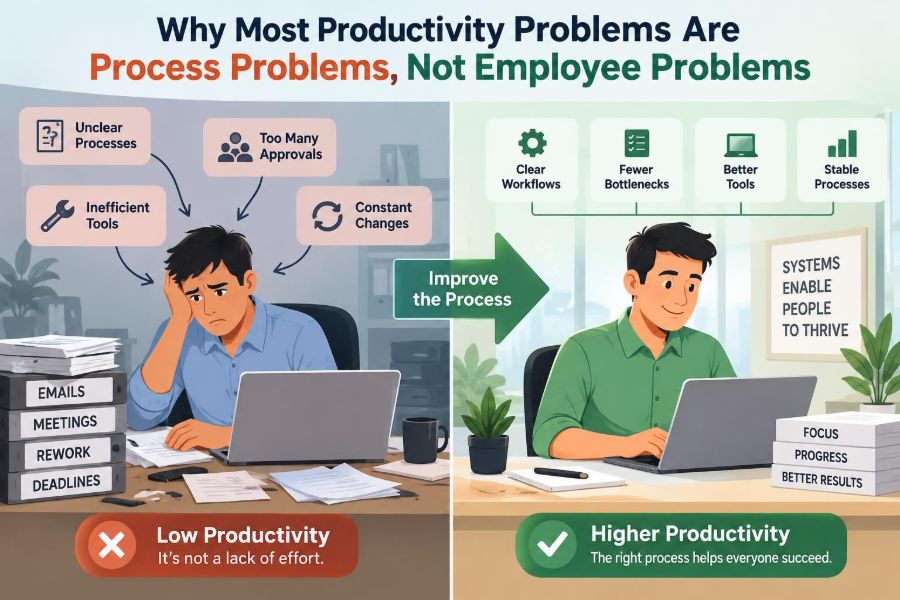

A capable employee starts the day with a full task list, three urgent messages, and a meeting that produces more work than clarity. By late afternoon, they have been busy almost continuously—but the important deliverable is still waiting.
The usual response is personal: work faster, focus harder, manage time better, show more ownership. Sometimes that is fair. But when the same delays, errors, and frustrations appear across several otherwise capable people, the cause is rarely individual effort alone.
Work gets done through systems: handoffs, approvals, tools, information flows, priorities, and decisions. When those systems are poorly designed, even conscientious people spend much of their energy navigating work instead of completing it.
Seeing productivity as a process issue does not remove individual accountability. It makes accountability more useful by asking a better question: what in the way work is designed is making good performance difficult?
🔍 Productivity Is More Than Personal Output
Productivity is often described as output per unit of input: useful work completed relative to time, effort, money, or resources used. In real workplaces, however, an individual’s output depends heavily on conditions they do not control.
A marketer cannot publish a campaign without approved copy. A service representative cannot solve a customer issue when account data is scattered across systems. A manager cannot make a good decision when the report arrives late or contains conflicting figures.
Personal discipline matters, but it operates inside a larger operating environment. Treating productivity as only a trait of the employee hides that environment from view.
🧭 The Difference Between a People Problem and a Process Problem
A people problem is primarily about capability, conduct, effort, or fit. For example, an employee may need training in a required skill, may repeatedly ignore a clear procedure, or may not have the capacity for a role.
A process problem is a recurring flaw in how work moves from request to result. It may involve unclear ownership, unnecessary approvals, missing inputs, incompatible tools, or priorities that change faster than work can be completed.
The distinction is practical, not ideological. Organizations need to address genuine performance issues. But they should not diagnose a system-wide pattern as an individual failure.
🚦 Repeated Bottlenecks Are a Strong Clue
A bottleneck is the step that limits the speed or volume of the entire workflow. It may be a single overloaded reviewer, a weekly approval meeting, a required data export, or a specialist team that receives every exception.
People downstream can work intensely and still make little progress while waiting at that point. Asking them to “be more productive” simply creates a larger queue.
Look for recurring waits: tasks that sit in the same status, requests that always require chasing, or work that piles up before one person or team. Those patterns point to workflow design, not laziness.
⏳ Waiting Time Often Hides Behind Busy Work
Most work processes contain two kinds of time: active time, when someone is actually doing the work, and elapsed time, which includes waiting. A request might require twenty minutes of effort but take ten days to complete because it waits for information, review, or a decision.
Employees often fill waiting periods with other tasks, so the organization sees activity rather than delay. Yet customers, colleagues, and project deadlines experience the full elapsed time.
Reducing waiting can improve results more than pushing people to complete active tasks a little faster.
🔁 Rework Is Not a Sign of Diligence
Rework occurs when completed work must be corrected, clarified, reformatted, or redone. Some rework is necessary when circumstances change. Persistent rework, however, usually signals an upstream failure.
Common causes include vague briefs, incomplete requirements, late stakeholder feedback, undocumented standards, and data that cannot be trusted. The employee doing the repair may look slow, even though they are absorbing defects created earlier.
A useful question is: what information or decision would have prevented this work from returning? That question directs improvement toward the source rather than the symptom.
📥 Bad Inputs Create Predictably Bad Outputs
No workflow can reliably produce high-quality work from incomplete or contradictory inputs. If a project request lacks a goal, audience, deadline, budget, or decision-maker, the team must guess—or repeatedly ask for clarification.
Consider a design team asked to create “something more engaging.” The request sounds simple but contains no usable standard for success. Multiple revisions are then treated as a design-performance issue, although the process began without a defined need.
Input quality should be designed into the process through request forms, intake conversations, examples, and clear acceptance criteria.
🧩 Unclear Ownership Slows Decisions
Work stalls when several people assume someone else owns the next step, or when everyone feels entitled to comment but no one has authority to decide. The result is often polite confusion: more messages, more meetings, and no movement.
Ownership should answer three different questions: who does the work, who makes the decision, and who must be informed. These roles may overlap, but they should not be left implicit.
Clear ownership does not mean rigid hierarchy. It means people can move work forward without guessing whose permission is required.
🗂️ Too Many Priorities Mean No Real Priority
When every request is urgent, employees constantly switch attention. They begin tasks without finishing them, respond to the loudest message, and defer important work that lacks an immediate advocate.
This is not necessarily poor time management. It is often a failure of organizational prioritization. Individuals cannot resolve conflicts between executive requests, customer escalations, routine operations, and long-term projects on their own.
Leaders need a visible method for ranking work and a willingness to say what will wait. A priority is meaningful only when it changes what people do next.
🔄 Context Switching Has a Real Operational Cost
Context switching is the mental and practical effort required to move between different tasks, systems, or problems. It includes reopening files, recalling prior decisions, checking messages, and rebuilding concentration.
A role that appears underutilized on a calendar may still be fragmented beyond usefulness. For instance, an analyst interrupted throughout the day for “quick questions” may have no uninterrupted period for analysis.
Process design can reduce this cost by grouping similar requests, protecting focus periods, establishing office hours, and using a shared knowledge base for routine questions.
📬 Communication Volume Is Not Coordination
More messages do not automatically create more alignment. In fact, excessive email, chat notifications, and status meetings can obscure the decisions people need to make.
Coordination improves when communication has a clear purpose: provide an update, request a decision, transfer ownership, identify a risk, or document an agreement. A channel full of mixed purposes makes every participant spend time sorting signal from noise.
Teams benefit from simple norms about where work is tracked, where decisions are recorded, and what qualifies as urgent.
🧱 Handoffs Create Risk at Every Boundary
A handoff happens when work passes from one person, team, or system to another. Handoffs are sometimes essential because specialization brings expertise. But every handoff can lose context, introduce delay, or create ambiguity about responsibility.
A customer request may pass from sales to implementation to support, with each group recording different details. The customer experiences one organization; internally, the process behaves like separate organizations.
Improve handoffs by defining the minimum information required, making the receiving party’s expectations visible, and reducing needless transfers where one team could complete the work end to end.
⚙️ Tools Should Reduce Friction, Not Add It
Technology can automate routine work and make information easier to find. It can also create a maze of duplicate data entry, separate passwords, manual exports, and dashboards that disagree.
When people maintain several systems because no single record is trusted, they are compensating for a design problem. Their extra effort may keep operations running, but it also makes the process fragile.
Before adding a new platform, map the current work. The relevant question is not “does the tool have features?” but “which repeated step, error, or delay will it remove?”
📊 Measure Flow, Not Just Individual Activity
Activity measures—calls made, messages sent, tickets touched, hours logged—can be useful operational signals. They become misleading when treated as the main definition of performance.
Flow measures examine how work moves through a system: time from request to completion, work waiting at each stage, return rates, blocked items, and outcomes achieved. They reveal whether the organization is converting effort into value.
| Measure focus | What it can reveal | Common limitation |
|---|---|---|
| Individual activity | Effort and workload | May reward motion over completion |
| Cycle time | How long work takes end to end | Can hide quality trade-offs alone |
| Rework rate | Where defects or ambiguity occur | Requires consistent tracking |
| Customer outcome | Whether work solved the real need | May be influenced by external factors |
🧪 Start With the Actual Work, Not Assumptions
Managers often describe a process as they believe it works. Employees can describe it as they have learned to survive it. Neither view is enough on its own.
Follow a real piece of work from beginning to end. Observe where it enters, what information arrives with it, who touches it, when it waits, and why it returns. This is often called process mapping: making the steps and decision points visible.
Use recent examples rather than idealized procedures. The gap between documented work and actual work is frequently where productivity is lost.
🗺️ Map the Work in Plain Language
A useful process map does not need specialized software. Start with a simple sequence: trigger, intake, assessment, action, review, completion, and follow-up.
At each step, ask who owns it, what they need, what system they use, what can block them, and what makes the step complete. Include informal workarounds, because those often reveal missing controls or broken interfaces.
The purpose is not to create a beautiful diagram. It is to make invisible dependencies discussable and improvable.
❓ Ask “Why” Without Looking for Someone to Blame
When an outcome fails, teams need curiosity before judgment. Asking why a deadline was missed can reveal several layers: a review was late; the reviewer lacked the required data; the data owner received the request too late; the intake form did not request it.
This kind of inquiry should not become an endless search for a single root cause. Complex work often has contributing conditions. The aim is to identify changes that reduce the chance of recurrence.
Blame makes people hide problems. A learning-oriented review makes the process safer to examine.
🛠️ Standardize Routine Work, Not Every Human Decision
Standardization means agreeing on a repeatable method for common work. Checklists, templates, definitions, and documented steps can reduce variation where variation creates mistakes.
It is especially useful for recurring activities such as onboarding, invoice processing, incident logging, and publishing routine reports. It frees attention for exceptions and judgment-heavy work.
Over-standardization is also a risk. Novel customer needs, creative work, and complex decisions require discretion. Good processes specify the routine path and make escalation paths clear when the routine path no longer fits.
✅ Define “Done” Before Work Begins
Many delays occur because people use different definitions of completion. One person believes a report is done when drafted; another expects reviewed data, an executive summary, and a published dashboard.
A definition of done states the conditions required for completion: required fields, quality checks, approvals, format, recipient, and any follow-up. It is not bureaucracy for its own sake; it prevents late surprises.
For larger projects, define acceptance criteria at the start so feedback is tied to agreed needs rather than personal preference.
🚪 Reduce Approval Layers With Care
Approvals can protect quality, compliance, spending, and reputation. They are justified when the decision carries meaningful risk or requires authority that the worker does not have.
But approvals often remain after their original purpose has faded. A low-risk decision may still travel through several managers because “that is how it has always been done.”
Review approval steps periodically. Clarify decision thresholds, delegate routine choices to the appropriate level, and distinguish an informed stakeholder from a required approver.
📦 Limit Work in Progress
Work in progress is anything started but not finished. When too much work is open at once, queues grow, attention fragments, and incomplete tasks compete for scarce review or specialist capacity.
Limiting work in progress does not mean doing less. It means finishing a sensible amount before starting more. A team might agree not to begin a new campaign until the current one has passed a defined review stage.
This can feel slower initially because new requests wait. Over time, completed work becomes more predictable and hidden backlog becomes visible.
🧯 Design Exceptions Instead of Improvising Them
Every process encounters exceptions: an urgent customer need, a missing document, a system outage, or a case that does not fit the usual rules. Problems arise when exceptions are handled through private messages and personal favors.
Informal rescue work can be valuable in a true emergency. If it becomes routine, it bypasses the data needed to improve the process and exhausts the people known for being helpful.
Create a visible escalation route with clear criteria. Then review recurring exceptions as evidence that the normal process needs adjustment.
👥 Involve the People Who Do the Work
Frontline employees understand the small frictions that dashboards often miss: a field that is always blank, a report that arrives too late, a customer question that triggers three systems, or a policy that creates avoidable callbacks.
Involving them is not merely good morale. It improves diagnosis. They can identify where the official process differs from reality and which changes would create new problems.
Participation should include feedback on proposed solutions, not only requests for complaints. Otherwise, consultation becomes another unproductive task.
🎯 Separate Capability Gaps From System Friction
Process thinking should not become an excuse to avoid difficult performance conversations. A well-designed workflow cannot replace a missing technical skill, unreliable conduct, or unwillingness to follow clear expectations.
The fair approach is to examine both conditions. Are instructions clear? Is training adequate? Is the workload reasonable? Do comparable employees encounter the same obstacle? Has the person received timely feedback and practical support?
If the system is sound and the gap remains specific, individual development or accountability may be appropriate. The key is to diagnose before prescribing.
⚖️ Avoid Using Process Improvement as Surveillance
Measurement can help teams see queues and improve service. It can also become a tool for monitoring every minute of employee behavior, creating anxiety and encouraging people to optimize numbers rather than outcomes.
Use the least intrusive information needed to understand the work. Explain what is being measured, why it matters, and how results will be used. Aggregate patterns are often more useful for process improvement than constant individual ranking.
Trust is operationally valuable: people are more likely to report delays, errors, and risks when data is not automatically used to punish them.
🌱 Test Changes in Small, Reversible Steps
Large redesigns can be necessary, but they carry disruption and uncertainty. When possible, test a change with one team, one request type, or a defined time period before imposing it broadly.
For example, a department could trial a shorter intake form and compare the number of clarification requests with the previous approach. The test should include both speed and quality, since faster work that creates more errors is not an improvement.
Small experiments turn opinions into practical learning and make it easier to adapt when a change has unintended effects.
📈 Improve the Constraint Before Optimizing Everything Else
Not every inefficiency deserves equal attention. A team can spend weeks polishing minor steps while the main delay remains untouched. Improvement has the greatest effect when it addresses the current constraint—the point limiting the whole workflow.
If legal review is the bottleneck, improving the formatting of an earlier request may have little impact. The better intervention might be clearer submission standards, a risk-based review path, or additional review capacity during predictable peaks.
Once one constraint improves, another may emerge. Process improvement is ongoing attention to the system, not a one-time cleanup.
🗣️ Managers Shape the Conditions for Productive Work
Managers influence productivity through more than motivation. They clarify priorities, protect teams from conflicting demands, allocate capacity, resolve cross-functional disputes, and decide which rules remain necessary.
A manager who praises speed while adding late approvals sends mixed signals. A manager who asks why work is stuck, removes an obstacle, and records the lesson improves the system as well as the immediate outcome.
Effective management therefore includes managing the process around people—not simply managing people inside it.
🏁 The Core Principle: Fix the Work Before Judging the Worker
Most organizations contain both individual performance issues and process flaws. The mistake is assuming that every missed deadline, slow response, or quality problem begins with employee effort.
Examine the flow of work: the inputs, decisions, handoffs, queues, tools, priorities, and feedback loops. Then make the smallest meaningful change that removes friction while preserving quality, accountability, and sound judgment.
When employees have clear goals, usable information, sensible authority, and a workflow that supports completion, their ability becomes easier to see—and their effort produces more value.
Productivity improves most sustainably when organizations design systems that allow capable people to do capable work. That is a more demanding standard than asking people to try harder, but it is also a far more useful one. 📊⚙️